

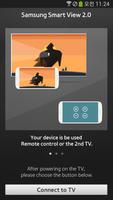
Smart View 2.0 is the content sharing application for 2014,2015 Samsung Smart TV
New Smart View is coming on October 2015.
Enjoy casting videos,music and photos from your mobile onto Smart TV easily and quickly.
Please note that you will no longer be able to use this app as a TV remote or mirror the TV signal on your mobile.
★Smart View 2.0 is the multiscreen application which helps content sharing between TV and mobile, and control the Smart TV ★
[Основные особенности]
★ Smart View 2.0 turns your mobile into a mini TV. ★
Вы можете наслаждаться всем, что вам нравится в своем Samsung Smart TV, прямо на вашем мобильном устройстве, используя Samsung Smart View 2.0 с функцией 2 -го телевидения SmartView, что на вашем телевизоре может быть на вашем телефоне.
※ We've noticed that a limited number of mobiles may receive a 2nd TV connection error. If you are one of them, we are working on a fix right now and will release an update as soon as possible.
★ Extend your mobile content to your Smart TV ★
With the “Multiscreen” Feature, You can send Videos, photos and Music from your mobile device to the TV screen. Let's enjoy your mobile content on the big screen with your family and friends.
★ Use your Mobile device as a TV remote Control!!! ★
Change channels, pause, resume, volume control, guides and so much more! Everything you need to connect and control your TV right from your mobile device.
☆ How to Use
① Connect your Samsung Smart TV to Wifi (TV Menu -> Network Setting)
② Connect your mobile device to the same Wifi Network.
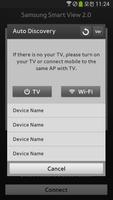
③ Launch the Smart View 2.0 App and select your TV.
※ Примечание. Your internet connection must support UPnP (Universal Plug and Play) functionality.
You can check this via your router settings pages on your home network. You can find out how to access this from the manfacturer's support website.
☆ Supported Devices
[Samsung Smart TV]
Полем 2014 Samsung Smart TV H5500 and above, (Except for H6003/H6103/H6153/H6201/H6203).
Полем 2015 Samsung Smart TV J4500, J5500 and above, (Except for J6203)
(※ Supported TV model can be vary by Country)
[Mobile]
Полем Galaxy S3 / S4 / S5 / S6 / Alpha
Полем Galaxy Note2 / Note3 / Note4 / Note Edge
Полем Galaxy Note 8" / 10.1" / 10.1"(2014 Edition) / Pro 12.2
Полем Galaxy Tab2 7" / 10.1"
Полем Galaxy Tab3 8"


 Скачать