

Desfrute de milhões dos mais recentes aplicativos do Android, jogos, músicas, filmes, TV, livros, revistas e muito mais. A qualquer hora, em qualquer lugar, em seus dispositivos.
More than just a PDF reader
Organize, Annotate, Share for free!
THANK YOU FOR YOUR SUPPORT! Installation of another APK is NO LONGER required! It's all about historical compatibility issues with devices running Android 2.2. Unfortunately we got quite a few one star comments for this :-(
The awesome SmartQ Reader provides you the fastest PDF viewer ever. With it you can easily access your PDF documents from almost any Android devices. Reading experience has also been greatly optimized for modern phones and tablets. Annotation, page cropping and sharing are not only useful and convenient but also bring you lots of fun. The built-in file manager helps you organize your documents, and sync them safely over the internet.
The ultimate goal for us is to build a powerful PDF Reader, professional, yet user friendly. We are working really hard to make it better and better. Plus, SmartQ Reader is, and will always be, FREE for anyone to use.
Compatible with the latest PDF standard
- The fastest PDF viewer with the best rendering quality.
- Full page zooming without mosaic blocks.
- Open links, view outline, add or delete a bookmark, no problem.
- Search any keywords you are interested.
- Comments are easy to made, just draw or type whatever you like.
- All Comments can be viewed seamlessly with any compatible viewer.
Powerful yet convenient to play with
- Select text to copy, highlight, search, translate, share, and many more.
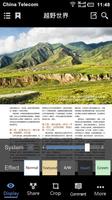
- Black and white, classical and inverted display, the best eye candies ever.
- Sharing is fun. Draw on the screen to select your favourite contents, send over email or weibo, there you go.
- White blank margins are annoying, try cropping tools, it can help a lot.
- Navigation has never been easier. Next page, previous page, with four-way control all you need just one single tap.
Organize your documents, sync safely
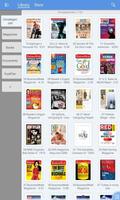
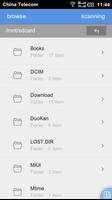
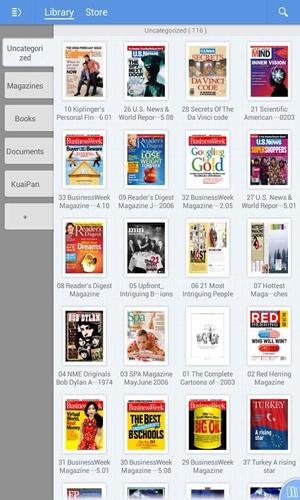
- Shelf view, list view, a built-in file browser. You can always locate your document very quickly.
- Too many documents in your storage? Categorize them by simply "drag and drop".
- Syncing by Kingsoft service is just as easy as operating a local file within categories.
- We also provide a simple privacy control. You can lock a category for unauthorized access.
- Using the integrated search feature, you can search local documents and resources from internet.
Platform support:
Most devices running Android 2.3+, 3.0+, 4.0+. However, Phones with x-small screen (320x480 or less) are not yet fully supported.
Language support:
We currently support only English and Chinese Simplified. Please let us know if you have language request other than these two. We are pleased to provide a translated version.
It's our first official publish on Google Play. The Customer Service is currently only available in mainland China. Please understand that our English Services are yet limited for the moment and we are doing our best to improve it.
If you have any questions or suggestions, please contact us or use the built-in feedback feature, Thanks!





 Download