• Home
  • Games
    Action-adventure Simulation Business Role Playing Sports Competition Casual Intelligence Card Strategy Music Rhythm Text Puzzle Flying Shooting Love Development
  • Apps
    Business Office Newsletter Social Life Entertainment Online Shopping Practical Tools Travel Financial Management Educational Learning Information Reading Sports and Health
  • Articles

English 中文(简体) 中文(繁体) 한국어 日本語 Português Español Русский العربية Indonesia Deutsch Français ภาษาไทย
Home Apps Practical Tools ZenWatch Remote Camera
ZenWatch Remote Camera

ZenWatch Remote Camera

1
2
3
4
5
Download
  • Version 1.0.0.161207
  • Category Practical Tools
  • Package Name com.asus.rcamera2
  • Update Time April 11, 2026
  • Size 7.62MB
About this app

Remotely control your smartphone’s camera with ASUS ZenWatch.

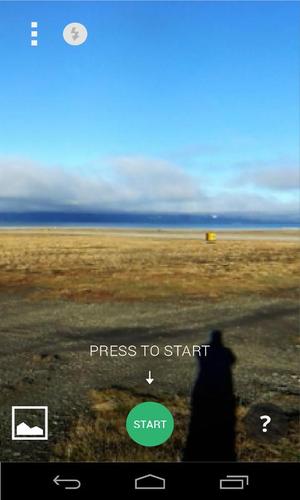
ZenWatch Remote Camera is a companion app for your ASUS ZenWatch that turns it into a remote control for the camera on your smartphone or tablet.

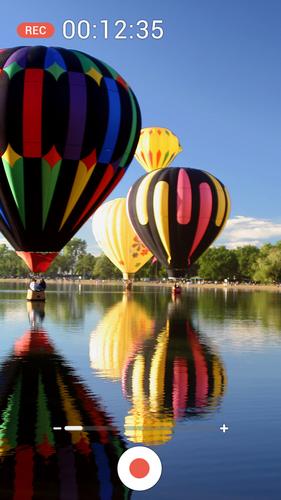
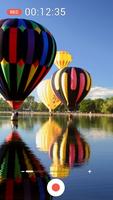
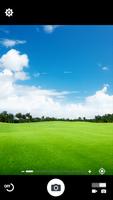
Remote Camera opens up new photographic opportunities by displaying your smartphone's camera viewfinder remotely on ZenWatch, freeing you to take photos from creative angles where the viewfinder would be difficult to see, such as when holding the phone overhead at a concert or other crowded event. Remote Camera is also useful for group photos, letting you compose the photo, release the shutter, and check the final result while being included in the shot.

[Reviews]

ASUS ZenWatch: A Fancy Smartwatch That Measures Your Relaxation Levels

http://mashable.com/2014/09/03/asus-zenwatch/

ASUS' stylish ZenWatch is all about security, remote control and wellness

http://www.engadget.com/2014/09/03/asus-zenwatch-android-wear-specs/

[Key features]

With ZenWatch Remote Camera, you can:

• Operate your smartphone’s camera from your ZenWatch

• See the camera viewfinder remotely on your ZenWatch

• Take single photos, optionally with location info

• Record videos

• Zoom in and out

• Start the camera’s self-timer

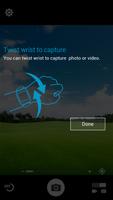
• Move your wrist (or shake the ZenWatch) to release the camera shutter.

[Tips]

• In ZenWatch Remote Camera, tap anywhere on the preview screen on the watch, or twist your wrist to take shot.

[Note]

ZenWatch Remote Camera is only compatible with ASUS ZenWatch smart watches.

What's New in the Latest Version 1.0.0.161207

Last updated on Dec 16, 2016 ↑ ★ ★ ★ ★ ★ ↑
Like this app? Keep us inspired by giving a 5-star rating!

V1.0.0.161207
1. Performance improvements and bug fixes
Download(7.62MB)
Users also viewed
  • Granny Horror Game Offline 3D

    Granny Horror Game Offline 3D

    1.0 April 11, 2026
  • Leopard Free Video Wallpaper

    Leopard Free Video Wallpaper

    1.4 April 11, 2026
  • mGerrit

    mGerrit

    2.111.90 April 11, 2026
  • Bedroom Girls

    Bedroom Girls

    4.0 April 11, 2026
  • World War Survival Heroes:WW2 FPS Shooting Games

    World War Survival Heroes:WW2 FPS Shooting Games

    3.1.3 April 10, 2026
  • Wifi Direct File Transfer

    Wifi Direct File Transfer

    1.0 April 9, 2026
  • Body Symbol HD

    Body Symbol HD

    2.6 April 9, 2026
  • Translating Keyboard

    Translating Keyboard

    1.0.5.1 April 9, 2026
  • Rhythm Guitar Free

    Rhythm Guitar Free

    1.1.0 April 9, 2026
  • Gentle Flowers Live Wallpaper

    Gentle Flowers Live Wallpaper

    8.1 April 8, 2026
  • Dress Photo Montage Editor

    Dress Photo Montage Editor

    1.9 April 7, 2026
  • Pic Grid

    Pic Grid

    1.3 April 7, 2026
  • Katana wallpapers

    Katana wallpapers

    60 April 7, 2026
  • HTC Transfer Tool

    HTC Transfer Tool

    7.0.1118500 April 7, 2026
  • Mr.Maintenance

    Mr.Maintenance

    1.2 April 6, 2026
About Privacy Policy Terms of Service Cooking Policy

© Copyright 2017-2026 downzr.com