

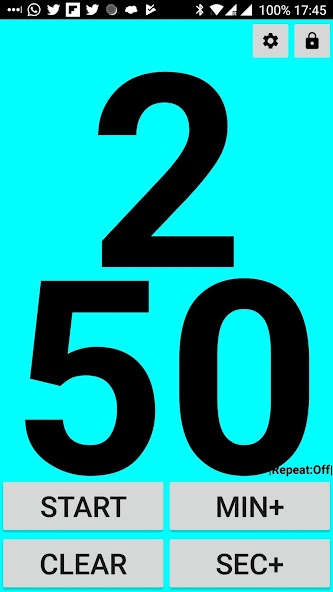
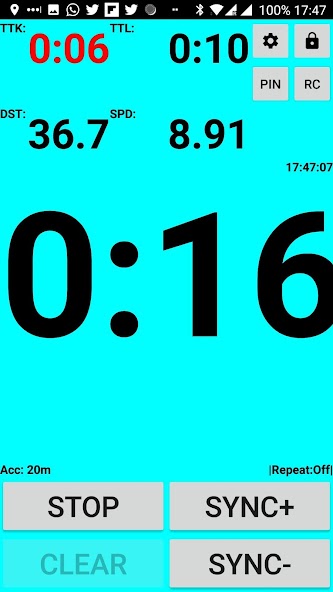
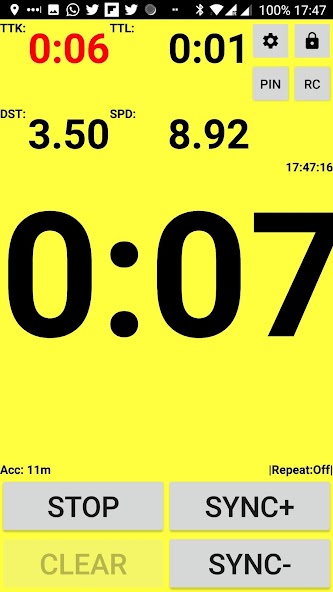
Smart watch for sailing starts. Shows distance to start line, big digits, simple
Sailing start timer.
- big numbers, easy to see
- speaks time
- easy controls
- can hook to GPS seconds, as many race officers do now
- shows distance to start line, need to enable it in options
- shows speed in knots
- shows time to start line
- shows how much time to kill, not to be over the line. Red means slow down.
- color coded distance, blue->more than 3 boat lengths, green 1-3 bl, yellow 0-1bl, red OCS
- lock screen to get bigger digits and prevent accidentally pressing
- can switch landscape and portrait orientation
- can log google earth kml files to check your start later
- special mode for race officers and coaches. says 5 seconds before each full minute
Guide:
Timer Buttons
NOTE: Timer Buttons are activated when lifting your finger from the button, so when the button is released.
PROG MIN, PROG SEC
Adds a minute or a second to the timer starting value. Only shows up when timer is stopped.
CLEAR
Clears the timer to 0:00
SYNC +, SYNC -, SYNC
Rounds the timer to higher or lower minute. Used to synchronize accurately if you missed the timing of the earlier signal. In app settings you can decide if it rounds to nearest minute no matter which SYNC button pressed
START, STOP
Starts or stops the timer
RC
Sets right end of starting line.(usually race committee side)
Pin
Sets left end of starting line.(usually pin side)
Setting up the starting line
App can show distance and time to start line. Setting the start line is simple. Just press RC button when at the right side end of line. Press Pin button when at left side end of line. Distance will be shown if turned on in app settings
Line can be set by entering coordinates manually. You can find it in the app settings.
If showing distance to line, you get new fields on the screen.
DST - distance to starting line in meters
TTL - time to line in seconds with current speed
TTK - time to kill to reach the line on time. Red when you are too fast. Green if you are too slow
SPD - Your speed in knots
ACC - GPS accuracy in meters
Timer will change the background color depending on your distance to start line. More than 3 boat lengths it would be cyan. 3-1 boat length green. Less than 1 boat length yellow. If over the line, it is red
Settings
Timer
Landscape mode - switch between landscape and portrait orientation
Repeat timer - timer starts over when reaching zero
Round seconds higher - Start is exactly when seconds reach zero. Otherwise you need to wait for zero second to expire
Auto Lock - locks buttons as soon as you start the timer. Preventing accidental button presses
Sync to GPS - syncs seconds to GPS time. Some Race Committees are using GPS time
Sync Button rounds to closest minute - having SYNC button rounding to closest minute. Otherwise there are two buttons, SYNC+ and Sync-
Text Size percentage - make numbers bigger or smaller
Start Line
Show distance to start line - turns on start line distance calculation
Speed to line averaging - amount of seconds to calculate your speed. Used to show time to line
Boat length in meters - used to set the color change depending on boat lengths to line distance
Log Starts - logs your track for viewing in Google Earth
Use Manual Start Line Values - under it you can set coordinates for your start line
Speak
RC mode - speaks last 5 seconds before each minute. For giving starting signals




 Download