

Experience the mail service optimized for work environment.
※ The new Works Mobile Mail app(v2.1.17) can only be used on Android OS 4.0 version and up.
[Key Features]
1. Shifting the 'View Type'
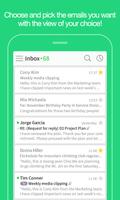
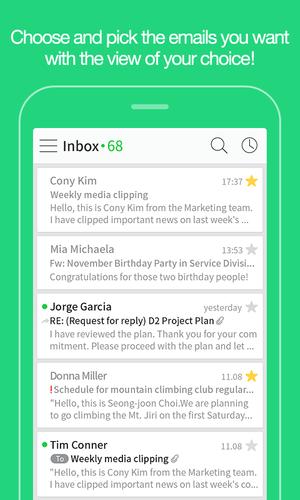
You can view the mails collected in chronological order using various view types including 'Interactive View' or 'View by Person'.
Tap the icon on the right side of the list and change to the most comfortable view type of your choice.
2. Find Faster with 'Quick Filter
If you want to view only desired mails, use 'Quick Filter.'
With a single touch, you can quickly view only unread mails/ important mail/mail with attachment/VIP mail.
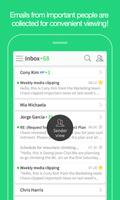
3. View by 'Sender'
The mail list will be organized based on the 'Sender' if you tap the person icon in the view shifting menu.
Quickly check mails from important people and bind unimportant mails to handle at once.
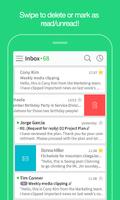
4. Read/Unread
You can simply swipe right to handle the mail as read/unread. Just swipe left to discard to trash.
5. Add to VIP
Add important person to you as VIP.
If you change to 'View by Person,' mails from VIP will appear at the top of the list and you can also filter to view only the VIP mails.
6. Preview Attachment
When checking received mails with attachment or double-checking if file has been properly added before sending, manage your attachments at once with 'Attachment List' unfolding in front of you all at once.
7. View/Manage Contacts
You can directly check the position, team and contact information in a profile page by tapping the sender's name. Reach the sender faster via phone or SMS during urgency.
8.Receipt Confirmation and Transmission Cancellation
You can directly check whether the mail I had sent has successfully arrived or if the receiver has read my mail. If the receiver uses the mail account of the same domain, already sent mail can be cancelled.
9. Sync Works Mobile Drive file
You can send large file using Works Drive or directly save the attachment in the received mail in Works Mobile Drive.
10. Password
Are you worried about other people peeping into your mail? Use the password lock.
You can safeguard your mails even when your phone is lost.
11. Support screen optimized for Tablet
Mail optimized for tablet environment, View more pleasantly with wider screen!















 Download