

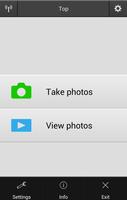
Control your Nikon camera wirelessly from your Android device.
The Wireless Mobile Utility connects your smart device to Nikon digital cameras wirelessly (via Wi-Fi), letting you download photos, take pictures remotely, and share them hassle-free via e-mail or upload to social networking sites.
•Principal Features
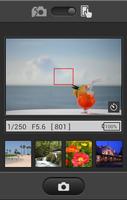
-View the scene through the camera lens live in the app window.
-Establish a wireless connection and take pictures with the camera or remotely from the Android device (see note).
-Download new pictures automatically.
-View existing pictures remotely and download selected photos.
-Pass photos to other apps via the OS "Share" intent and share them hassle-free.
-Add location data from the smart device to pictures during upload.
-Control optical zoom on COOLPIX cameras (see note).
-Control the overall brightness of pictures during shooting (see note).
-Use the camera to select pictures for download before connecting (see note).
-If both the camera and smart device support NFC, touching the device to the camera automatically launches the app for a hassle-free connection (see note).
-Take pictures with the self-timer.
-Synchronize the camera clock with the smart device.
•Cautions
- Cannot be operated with a SnapBridge-compatible camera.
-Note: The features available vary with the camera. See the camera manual or the link below for details.
-The app may not recognize photos taken with non-supported cameras.
-The app can not be used for remote movie recording. It can be used to download movies from compatible cameras (COOLPIX S6900 and S3700 excluded) but not to play them back.
-The photo and movie portions of Motion Snapshots are treated as separate files.
-Only one camera can be connected at a time.
-Enable NFC on the smart device before using it to launch the app and connect to the camera.
-Performance varies with network and local conditions.
-The app may not function as expected when installed on devices that have not been tested and approved for use.
-A display with a resolution of at least 800 by 480 pixels (WVGA) is required.
•User's Manual
For more information, see the app manual, which can be downloaded from the following URL:
http://nikonimglib.com/ManDL/WMAU/
•Terms of Use
Before using the app, download and read the End User License Agreement, available at the following URL:
http://nikonimglib.com/eula/WMAU/
Supported Digital Cameras as of December 2016
Requires a camera with built-in wireless LAN or support for the WU-1a/b wireless mobile adapter.
The S800c and S810c are not supported.
D610, D600, D750, D7200, D7100, D3300, D3200, D5500, D5300, D5200, Df
Nikon 1 V3, V2, J5, J4, J3, S2, S1, AW1
COOLPIX S7000, S6900, S6800, S6600, S6500, S9900(s), S9700(s), S9600, S9500, S5300, S5200, S3700, L840, P520, P330, P7800, P900(s), P610(s), P600, P530, P340, COOLPIX A, AW130(s), AW120(s), AW110, AW110s,
•Smart Device System Requirements
Android 5.0 or later, 6.0 or later, 7.0 or later, 8.0 or later, 9.0
A smart device with support for GPS.
There is no guarantee that this app will run on all Android devices.
•Trademark Information
Android, Google Play, and their logos are trademarks or registered trademarks of Google Inc.
All other tradenames mentioned in this document are the trademarks or registered trademarks of their respective holders.




 Download