
• Home
  • Games
    Action-adventure Simulation Business Role Playing Sports Competition Casual Intelligence Card Strategy Music Rhythm Text Puzzle Flying Shooting Love Development
  • Apps
    Business Office Newsletter Social Life Entertainment Online Shopping Practical Tools Travel Financial Management Educational Learning Information Reading Sports and Health
  • Articles

English 中文(简体) 中文(繁体) 한국어 日本語 Português Español Русский العربية Indonesia Deutsch Français ภาษาไทย
Home Apps Practical Tools WiFi ADB
WiFi ADB

WiFi ADB

1
2
3
4
5
Download
  • Version 3.0.6
  • Category Practical Tools
  • Package Name com.ttxapps.wifiadb
  • Update Time May 22, 2026
  • Size 1.66MB
About this app

Debug apps on device over air, wireless, no cable, free, no ads (root required)

Note: This app only works on rooted devices. If you don't know what it means or if your device is not rooted please don't install.

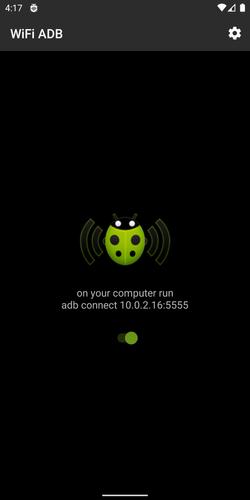
WiFi ADB makes it easy to debug and test your Android apps directly on device via WiFi TCP/IP connection. No need to use USB cable. After enabling ADB over WiFi, to connect your computer to the device open the console and run

adb connect <device_ip_address>

FEATURES

• Quickly enable/disable ADB connection over WiFi TCP/IP

• Auto-enable ADB over WiFi on known WiFi networks

• Once enabled an ongoing notification is shown to remind users that ADB over WiFi is active and make it easy to disable it manually

• Temporarily increase screen-off timeout. Nine times out of 10 this is what users want during development of an Android app and testing it on device. The original screen timeout is restored when ADB over WiFi is disabled.

• Temporarily lock WiFi, prevent it from going into sleep mode (how effectively it works depends on device and Android version)

• Also acts as a Tasker plugin. Users can configure Tasker app to automatically turn on/off WiFi ADB based on defined conditions

TIPS

• Your computer must be allowed to connect to your device over ADB. The permission must be granted when your device is connected via USB cable. This needs to be done only once.

• If your development computer is Unix/Linux or Mac open a console and run

while true ; do adb connect <device_ip_address> ; sleep 15 ; done

This one-liner auto-reconnects to ADB daemon on the phone every time the link is broken for whatever reason.

• If you control the WiFi router, configure it to give the device the same IP address every time. Then assign a local DNS hostname to that IP address so that you can use it instead of an IP address in the adb connect command in the console.

What's New in the Latest Version 3.0.6

Last updated on Apr 27, 2020 Version 3.0
- Updated app for Android 10
- Removed in-app donation button
Download(1.66MB)
Users also viewed
  • NAVTEX Marine Weather

    NAVTEX Marine Weather

    1.01 August 30, 2026
  • Dandelions field

    Dandelions field

    1.3 August 29, 2026
  • ActiveCrime

    ActiveCrime

    3 August 29, 2026
  • PythCal

    PythCal

    1.1 August 28, 2026
  • Spotifree V1 Beta

    Spotifree V1 Beta

    1.0.0 August 28, 2026
  • Book A Flat

    Book A Flat

    1.0.6 August 28, 2026
  • Zodianet HD

    Zodianet HD

    2.4.1 August 28, 2026
  • GO SMS HIP POP THEME

    GO SMS HIP POP THEME

    1.0 August 27, 2026
  • Launcher 10 Theme

    Launcher 10 Theme

    1.1 August 27, 2026
  • Magazine Cover Studio

    Magazine Cover Studio

    2.1 August 27, 2026
  • World Weather Forecast App for

    World Weather Forecast App for

    1.0 August 27, 2026
  • RGRHCL Indira Mane Ver  - 1.4

    RGRHCL Indira Mane Ver - 1.4

    13.0 August 27, 2026
  • HD Christmas Theme

    HD Christmas Theme

    1.0 August 26, 2026
  • Call screen - Color your call

    Call screen - Color your call

    2.0.0 August 26, 2026
  • El Tiempo en Chile

    El Tiempo en Chile

    Clima en Chile August 26, 2026
About Privacy Policy Terms of Service Cooking Policy

© Copyright 2017-2026 downzr.com