• Home
  • Games
    Action-adventure Simulation Business Role Playing Sports Competition Casual Intelligence Card Strategy Music Rhythm Text Puzzle Flying Shooting Love Development
  • Apps
    Business Office Newsletter Social Life Entertainment Online Shopping Practical Tools Travel Financial Management Educational Learning Information Reading Sports and Health
  • Articles

English 中文(简体) 中文(繁体) 한국어 日本語 Português Español Русский العربية Indonesia Deutsch Français ภาษาไทย
Home Apps Life Entertainment TrinusVR Skyrim Edition
TrinusVR Skyrim Edition

TrinusVR Skyrim Edition

1
2
3
4
5
Download
  • Version 2.0.2
  • Category Life Entertainment
  • Package Name com.loxai.trinus.skyrim
  • Update Time April 4, 2025
  • Size 50MB
About this app

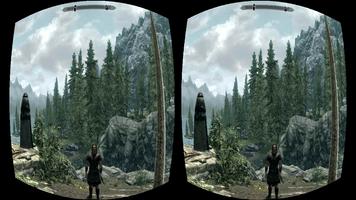
Play Skyrim in VR using your phone and Google Cardboard

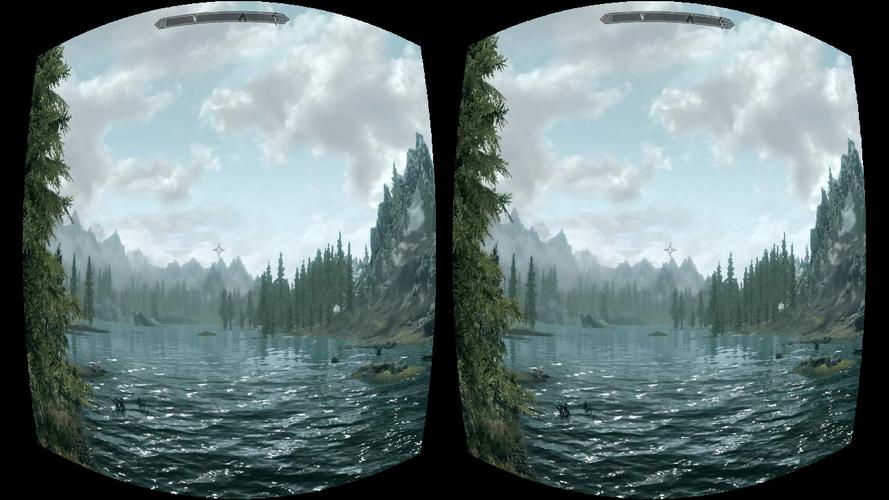
TrinusVR will let you live the world of Skyrim in Virtual Reality. By linking the phone app with the PC server, headtracking is delivered to the game, which is displayed on the phone properly formatted for VR.

You will need Google Cardboard or other head mount to place your smartphone and visualise the game.

Details on how to set up can be found at http://trinusvr.com

You will need to install the PC server, which can be downloaded from http://trinusvr.com

For best performance and sorting out common issues, it is recommended to review the help page at http://trinusvr.com/quick-guide-and-common-issues

Features:

- Wireless video streaming, allowing complete freedom of movement. Or...

- USB streaming, for improved performance

- Full rotation headtracking

- Fake 3D (for games not supporting stereoscopic mode)

- Adjustable lens settings to match your specific head mount

Notes:

- This version will let you play for 20 minutes at a time. Get the full version to avoid time restrictions https://play.google.com/store/apps/details?id=com.loxai.trinus.full

- You will need to install the free PC server: http://trinusvr.com

- Vireio or TriDef is required for full 3D (stereoscopic) immersion

Requirements:

- Fast phone and Windows PC

- Google Cardboard or similar (there are plenty of good quality headsets available)

If trinusvr.com is down for some reason, you can directly download the TrinusVR server app from the following location:

https://www.mediafire.com/?lljk9u7fl6lm75k
What's New in the Latest Version 2.0.2

Last updated on Sep 1, 2015 Fake Roll (optional and only available with Lens correction off)
Changed network detection (+ USB activation button)
Bug fixing
More changes on Trinus PC
Download(50MB)
Users also viewed
  • GO Keyboard Color Heart

    GO Keyboard Color Heart

    2.2.2 January 15, 2026
  • QB

    QB

    2.1.2 January 15, 2026
  • Grill Right

    Grill Right

    1.0.3 January 14, 2026
  • ARWatch

    ARWatch

    1.1 January 13, 2026
  • QW Home Automation

    QW Home Automation

    1.3 January 13, 2026
  • Angry Firefly Free!

    Angry Firefly Free!

    1.074 January 13, 2026
  • Happy Thanksgiving 2020 Greeting Cards

    Happy Thanksgiving 2020 Greeting Cards

    1.4 January 12, 2026
  • Mundo Copec

    Mundo Copec

    7.0.17 January 12, 2026
  • Guide for Sonic Dash

    Guide for Sonic Dash

    1.0 January 12, 2026
  • Nail Art 2015 with Tutorial

    Nail Art 2015 with Tutorial

    1 January 11, 2026
  • Drum Pads

    Drum Pads

    1.0.3 January 11, 2026
  • Items

    Items

    1.3.32 January 11, 2026
  • Global Assist

    Global Assist

    2.2.0 January 10, 2026
  • KRO Detectives

    KRO Detectives

    1.0 January 10, 2026
  • Hello Collages

    Hello Collages

    1.1 January 9, 2026
About Privacy Policy Terms of Service Cooking Policy

© Copyright 2017-2026 downzr.com