• Home
  • Games
    Action-adventure Simulation Business Role Playing Sports Competition Casual Intelligence Card Strategy Music Rhythm Text Puzzle Flying Shooting Love Development
  • Apps
    Business Office Newsletter Social Life Entertainment Online Shopping Practical Tools Travel Financial Management Educational Learning Information Reading Sports and Health
  • Articles

English 中文(简体) 中文(繁体) 한국어 日本語 Português Español Русский العربية Indonesia Deutsch Français ภาษาไทย
Home Apps Travel Navi Auto Start (NAS)
Navi Auto Start (NAS)

Navi Auto Start (NAS)

1
2
3
4
5
Download
  • Version 1.3.3.000
  • Category Travel
  • Package Name net.softm.startnavi.poweron
  • Update Time March 19, 2026
  • Size 29.29MB
About this app

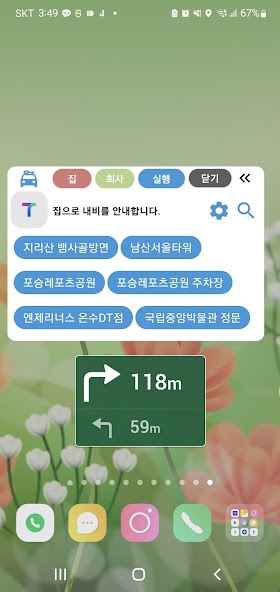
Charging, Bluetooth connection, “Navigation app” launch & routine

Automatically launches and closes the app (navigation app).

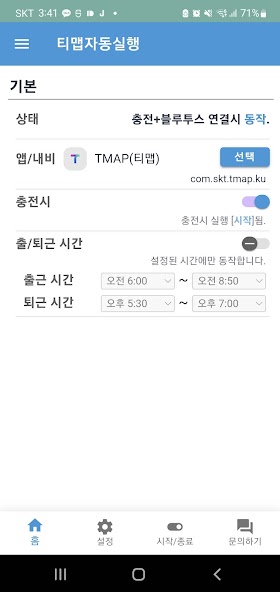
✇ Operating conditions: Power (charging), Bluetooth, Wi-Fi connection/disconnection

✤ You can choose which apps to run.

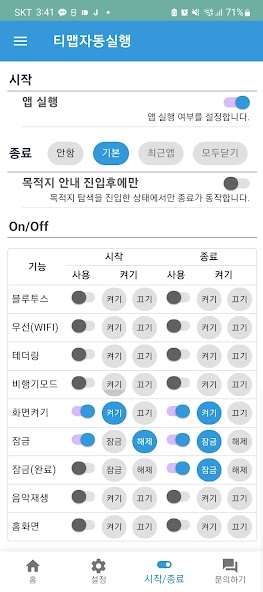
✤ On/Off routine when starting and ending the app: screen lock, wireless (WIFI), Bluetooth, airplane mode, music playback, etc.

✤ If you turn off running apps, you can only run routines.

✤ You can specify ‘Home’, ‘Work’, and ‘Favorites’.

✤ Support navigation apps

- T Map, Kakao Navi, Google Map, Naver Map, Mappy, Godeok Map, Baekseok Map

- TMAP (SKT), Google Maps, Google Maps Go, Naver Map, Kakao Map, Kakao Navi, ONE NAVI (KT), Mappy, Atlan, WAZE, OsmAnd, SYGIC, High Detailed Map, Maps.me

⚙︎ Basic usage method

1. Connect to power (charge)/Bluetooth to your cell phone. (Wireless charging available)

2. ‘Navi’ automatically starts providing guidance.

- ‘Company’ information in the ‘morning’.

- Guide to the ‘house’ in the ‘afternoon’.

3. It can be operated by specifying the commute/leave time.

※ ‘Accessibility API’ policy information

1. ‘Accessibility API’ is used to control app termination, Wi-Fi activation/deactivation, mobile hotspot activation/deactivation, and notification bar settings.

2. Button click (dispatchGesture, GLOBAL_ACTION_QUICK_SETTINGS): Wi-Fi, airplane mode On/Off

3. Screen lock (GLOBAL_ACTION_LOCK_SCREEN)

4. Home screen (KEY_GLOBAL_ACTION_HOME)

5. Go back (KEY_GLOBAL_ACTION_BACK)

6. Automatically close apps (GLOBAL_ACTION_RECENTS)

※ If an error occurs, please delete and reinstall. thank you

✉ Email: [email protected]

What's New in the Latest Version 1.3.3.000

Last updated on Mar 2, 2025

1. Add music player selection function
2. All functions activated togles (notification bar)
3. Run safe driving (driving) mode when setting up the information mode "driving"
4. Improvement of Favorites Functions
5. Support: Subscribe, purchase
6. Advertisement display
Download(29.29MB)
Users also viewed
  • Chatterbus

    Chatterbus

    0.1.7 March 19, 2026
  • Avg Speed

    Avg Speed

    3.3 March 19, 2026
  • Downtown NYC

    Downtown NYC

    1.11 March 17, 2026
  • Opal Mobile

    Opal Mobile

    3.1 March 17, 2026
  • Consumo do Carro

    Consumo do Carro

    2.5.3 March 15, 2026
  • InTime Spedice

    InTime Spedice

    1.2.2 March 14, 2026
  • TOAF mobile

    TOAF mobile

    0.0.53 March 14, 2026
  • YUBISASHI Phrase book English

    YUBISASHI Phrase book English

    1.0.1 March 14, 2026
  • E-rijden

    E-rijden

    1.1 March 13, 2026
  • MTS GO!

    MTS GO!

    1.2 March 11, 2026
  • Taxi Viet - Quick Call Taxi

    Taxi Viet - Quick Call Taxi

    1.3 March 10, 2026
  • Autogas Tankstellen Finder

    Autogas Tankstellen Finder

    2.0 March 9, 2026
  • Vogtland

    Vogtland

    3.20.7 March 9, 2026
  • ShortLine

    ShortLine

    1.0.4 March 9, 2026
  • Liberty Rider

    Liberty Rider

    2.50.1 March 8, 2026
About Privacy Policy Terms of Service Cooking Policy

© Copyright 2017-2026 downzr.com