• Home
  • Games
    Action-adventure Simulation Business Role Playing Sports Competition Casual Intelligence Card Strategy Music Rhythm Text Puzzle Flying Shooting Love Development
  • Apps
    Business Office Newsletter Social Life Entertainment Online Shopping Practical Tools Travel Financial Management Educational Learning Information Reading Sports and Health
  • Articles

English 中文(简体) 中文(繁体) 한국어 日本語 Português Español Русский العربية Indonesia Deutsch Français ภาษาไทย
Home Apps Practical Tools Speeds Watch Face
Speeds Watch Face

Speeds Watch Face

1
2
3
4
5
Download
  • Version 2.0.8
  • Category Practical Tools
  • Package Name co.smartwatchface.watch.face.speedometer.android.wear
  • Update Time December 14, 2024
  • Size 7.49MB
About this app

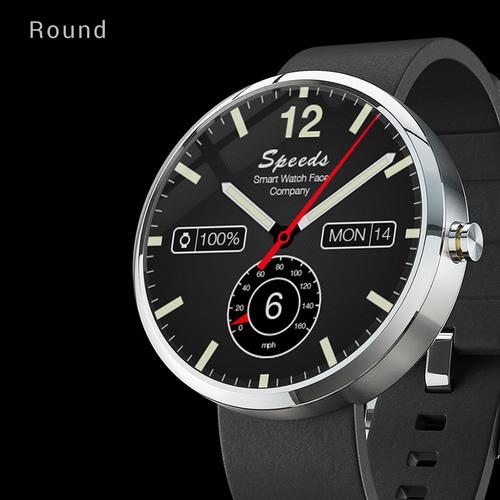
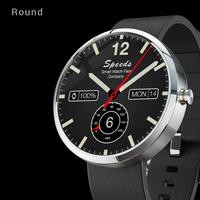
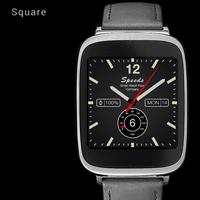
Speeds turns your Android Wear watch into a sporty time machine.

“Speeds” watch face turns your Android Wear watch into a sporty time machine.

This free analog watch face unites classic sportive design with modern smartwatch functionality.

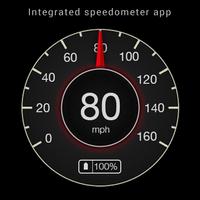
It is an iconic custom watchface and a speedometer app at the same time.

★ Sports watch with superb readability

★ Easy to use companion speedometer app

★ Adventurous spirit and exclusive design

★ Customizable Android Wear watch face

★ Works for round and squared watches

Watch face functions:

- Classic Wear watch face

- Battery level indicator

- Date numerical

- Day of the week

Also check Speeds Pro Version:

- Link to Pro Version: http://goo.gl/j1Wf57

- Speed information

- Compass

- Step tracker

- Weather

- Second time

- Battery level indicator

- Date and day of week

Speedometer wear app (how to):

- Tap on the watch face

- Select start menu

- Choose Speeds App

- Speedometer will be opened

- GPS and speed tracking will be activated

Why does watch face always show 6 mph?

- Please open the integrated speedometer app to get accurate speed information

- The speed element shown on the watch face is just for design purposes

- Constant GPS tracking would drain too much battery

- Please be aware that the speedometer app relies on the quality of the GPS signal of your smartphone.

- Please do not rely on the displayed information.

Supported devices

- Works on all Android Wear devices

- Supports round (Moto 360) and rectangular smartwatches (Samsung Gear Live and LG G Watch).

- Does NOT work on Samsung Gear and smartwatches using other operating systems

More watch faces

- Visit our exclusive wearface collection for Android Wear on the Play Store http://goo.gl/QOsOu4

- Also please let us know if you like to have any other watch faces to be added to our selection of watch faces.

Engineered with love in Germany
What's New in the Latest Version 2.0.8

Last updated on Sep 23, 2015 2.0.8 Minor bug fixes

2.0.7 Fixes to speed tracking functionality
Download(7.49MB)
Users also viewed
  • PureSense Irrigation Manager

    PureSense Irrigation Manager

    1.4.0 December 2, 2025
  • GLview

    GLview

    6.4.101 November 30, 2025
  • DevelopQuickSetting

    DevelopQuickSetting

    1.1 November 30, 2025
  • Signal Care Free

    Signal Care Free

    3.0.6 November 30, 2025
  • Sensor Check

    Sensor Check

    1.2 November 30, 2025
  • Gallery Pro

    Gallery Pro

    1.1 November 30, 2025
  • Japanese for GO Keyboard-Emoji

    Japanese for GO Keyboard-Emoji

    3.0 November 29, 2025
  • One tap boost

    One tap boost

    1.0.1 November 28, 2025
  • Beautiful Cloud WatchFace Free

    Beautiful Cloud WatchFace Free

    1.0 November 28, 2025
  • Floating Info

    Floating Info

    2.1 November 28, 2025
  • AMemoryTool Swap Enabler Root

    AMemoryTool Swap Enabler Root

    Dauis v6.8 November 28, 2025
  • RealTime Utilities - Sidebar

    RealTime Utilities - Sidebar

    1.1 November 28, 2025
  • 14 days Transparent Weather

    14 days Transparent Weather

    2.1.0 November 27, 2025
  • Ultimate Mandolin Tuner

    Ultimate Mandolin Tuner

    1.11.4 November 27, 2025
  • Photo Shine

    Photo Shine

    1.0.2 November 27, 2025
About Privacy Policy Terms of Service Cooking Policy

© Copyright 2017-2025 downzr.com