

Application for fast and smart management of sound profiles!
Fully customizable profiles are the basis of SVC+. You can switch them manually or automatically using a schedule according to time, calendar, location, Wi-Fi networks and Bluetooth devices. Also, you get the ultimate Speed Volume mode, headphones mode and many other cool features.
KEY FEATURES
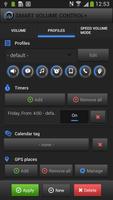
- fully customizable sound Profiles
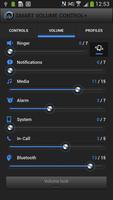
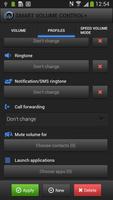
- setup Volumes, Bluetooth, WiFi, AP (hotspot), Mobile data, Aeroplane mode, Call forwarding, Screen brightness and Ringtones
- mute or raise volume for selected contacts including vibration options
- Volume Lock and Silent mode detection
- automatic launch of selected applications with profile
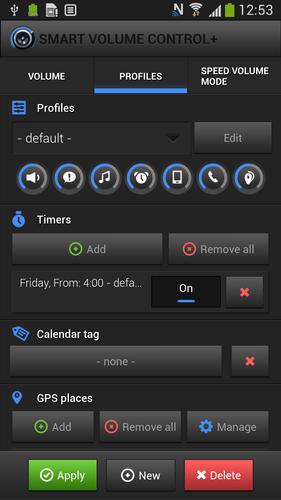
- switch profiles by Timers, Locations, Calendar, Wi-Fi and Bluetooth
- Speed volume mode and Headphones mode
- 30 Widgets designed for quick and convenient control from your home screen
- various applications and widget skins for perfect harmony with the color and settings of your Android
- low energy demand on battery
- localized in 13 languages: ENG, SPA, POR, FRE, GER, RUS, KOR, CHI, JPN, ITA, POL, CZE, SLO
PROFILES BY TIMERS
Are you tired of adjusting the volumes manually? With a SVC+, you can schedule the activation of profiles using timers.
Are you sick of muting the ringer at night, restoring it in the morning, or even turning the WiFi or Mobile data on and off? SVC+ can do it for you.
PROFILES BY LOCATIONS
Add your favorite places and let the application switch profiles according to your current location.
Do you use Bluetooth and Mobile data on your way to work, and then in the office, you need to enable WiFi instead? Add both the place where you park and the location of your office, and let SVC+ take care of the rest!
PROFILES BY CALENDAR EVENTS
Do you have a busy schedule? Let profiles be switched by the events in your calendar (Gmail, MS Exchange and more). All you need to do is to add profile tag to the title or description of the event.
PROFILES BY WI-FI NETWORKS
With this feature, you can switch profiles when connected to selected Wi-Fi networks. Assign profile "work" to your Wi-Fi network in the office and when the connection is made, your phone will automatically turn to silent mode, e-mail client starts and the ringtones or vibrations will be allowed for your VIP`s only.
PROFILES BY BLUETOOTH DEVICES
Do you like to ride a motorcycle, bike, or exercise and listen to your favorite music? After connecting the Bluetooth headset, you will never need to manually turn on the music player, or Speed volume mode.
SPEED VOLUME MODE
Do you listen to music in public transport? Does it bother you when music is too loud at the bus stop or while driving barely heard? Treat your hearing to better with a SVC+ and Speed volume mode, dynamically adjusting the volume according to the speed at which you are moving.
HEADPHONES MODE
Do you want to hear music with headphones and be sure that if the headphones were accidentally ripped off, you won't be embarrassed by loud noises from your phone, e.g. in your doctor's waiting room? The headphones mode ensures that the sound is muted when headphones are unplugged. It restores the volume when the headphones are plugged in again.
SILENT MODE DETECTION
Do you wish to take a nap after lunch and don't want to be disturbed for at least half an hour? The SVC+ can detect silent or vibrate mode and offer you an option to automatically increase the volume after selected time.
SUPPORT
Application SVC+ was thoroughly tested on all versions of Android up to the latest 4.4 KitKat. It is optimized for tablets too.
If you have a problem or question, you can always contact our technical support: [email protected].
A lot of answers can be found in help and FAQ: http://smartvolumecontrol.com/en/help-center.
Video tutorials "step by step" are prepared to inspire you here: http://www.smartvolumecontrol.com/tutorials/.
News in version 1.1.8
-Ability to lock the volumes independently
-Improved compatibility for "NFC Profiles for SVC" plugin
-Added delay before the Wi-FI profile switch
-Fixed application crashes when adding new GPS location
-More than 350 various bugfixes
-...
In case of problems, please restart your device. If the problem still persists uninstall SVC+ and install it again. If none of these help contact our support - [email protected].







 Download