

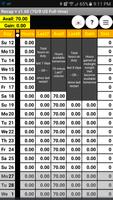
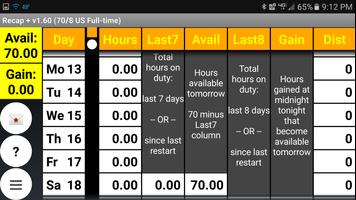
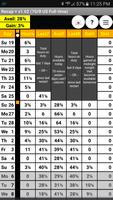
Recap+ assists commercial drivers with their DOT logbook recap
Recap +
Hours of Service Driver's Daily Log Recap Calculator Plus
Copyright (c)2012 WarSOFT Apps
All Rights Reserved
"Takes the pencil and calculator out of figuring your Daily Recap"
Written for Professional Drivers
by a Professional Driver
Please. If you have an issue, please email me for help. I'm a driver just like you. This app is provided freely. All I ask is to contact me for help before leaving a bad review. Bad reviews don't help anyone. I appreciate it.
I'm sorry to report that there is no iPhone version of Recap+. I am not an IOS developer. It's a completely different system, with different requirements. I apologize for this inconvenience.
What's new? My main goal was to simplify as much of the end of day logbook processing as I possibly could. The original Recap helped, but it was still necessary to grab a calculator to figure miles driven. I have listened to you, the professional drivers that use my original Recap, and the following requested and time saving features were added:
1) Email your recap to your dispatch office.
2) Ability to see hours gained in future days until no more can be gained. Also, the ability to forecast, or see 'what if' situations by inputting on duty hours expected for future days, working with future hours gained, to see how it ends up. Very handy to see if you can run that extra load or not. Any future hours entered are not permanent and zero out between runs.
3) Configurable Hours of Service Rules. Recap + is not limited to the standard US 70 hours in 8 days (70/8). Recap + has 60/7 US Part time, 70/7 Canadian Cycle 1, 70/8 US Standard Full time, 80/8 California local, 120/14 Canadian Cycle 2, and the ability to input a customized HOS that isn't pre-configured. This was the most requested upgrade.
4) Enter starting and ending odometer readings to calculate and display miles driven for each day. The starting odo reading is automatically filled in if there are any previous days that have an ending odo. The ending odo can be entered as the last 3 digits instead of the entire reading.
5) Landscape mode is now supported. Also, a new custom keyboard allows easy data entry.
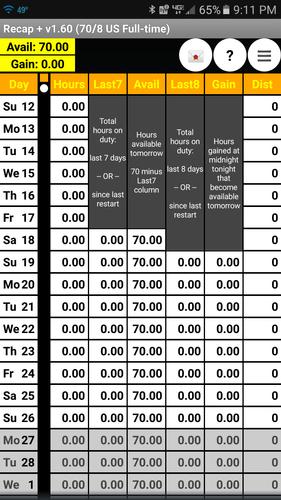
6) A Gain column has been added to show the driver how many hours they will gain after midnight.
7) Enhanced grid with explanations in the Last 7, Avail, Last 8, and Gain columns, just like in your logbook. The enhanced grid also now displays the professional drivers most needed recap data for TODAY (ie. the last day in the recap grid): 1) how many hours the driver has available to drive today, and 2)how many hours they will pick up at midnight, in two oversized highlighted fields. Once on-duty hours are entered for Today, these fields will be replaced by the regular recap grid fields. Until then, a driver can see this data at a glance. Glance at it in the morning to assist you in your trip planning.
8) The ability to remove the enforcement for quarter hour on-duty hour entries. This will allow users of electronic logs to use Recap +. Hours may also now be entered as minutes (0 - 59) as well as hour parts (0 - 99).
9) Since not all logbooks are created equal, and some have a different column layout, Recap + has the ability to rearrange the columns. Please read the help file concerning this setup, as some columns will display different data depending on their position on the recap grid. This is important!
10) Added daily automatic backup with manual restore option April 4, 2013.
Any comments, including bug reports, suggestions, upgrade requests, etc... may be emailed to me at [email protected]. I will respond to legitimate inquiries as soon as possible. Give me a chance to fix it. Leaving bad reviews doesn't help anyone. Thanks!!!
Recap + will initially install to internal memory, but can be moved to SDCard from Home screen/Settings/Applications/Manage applications/Recap +.
This app is completely free, with no ads.
Powered by B4Script...








 Download