

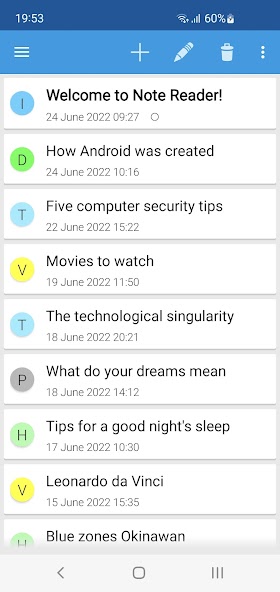
Notes app with Text Scanner and Read Aloud function with Text to Speech (TTS)
With Note Text Reader you can take notes, scan text and save articles. The app can read aloud your notes with Text to Speech.
Key Features
• Take notes and give them a colored label to organize your notes.
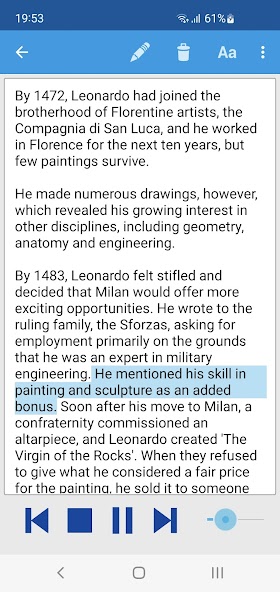
• Text to Speech reader with play, pause, back and forward buttons and a progress bar.
• Text Scanner: scan Image to Text with OCR.
• Share text from any website into notes.
• Import text files into notes.
Other Features
• Highlighting of the spoken sentences.
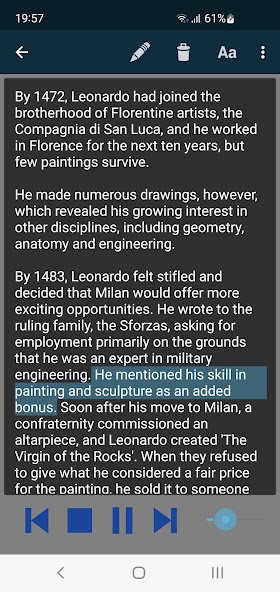
• Light and dark theme.
• Backup and restore to Google Drive.
• Change the font and text size of the notes.
• Several sorting options.
• Option to pin notes at the top of the list.
• Phone layout and Tablet layout with preview of the text of the note.
Retrieve text from websites or other apps
If you find interesting articles or texts in others apps or on a website in your browser, it can be very convenient to save the information in one central app, so you can read or have the text read aloud at a later time.
If you want to save an article, you can go to the share function of the browser or the other app and share to Note Player. You can then choose to share the link or the text of the website. The text will be retrieved from the shared link.
Useful for people who are speech-impaired
The app can also be a useful AAC tool for people who are speech-impaired for communicating longer texts with more control over the spoken text with the play-buttons. For example if you want to give a public speaking.
Speech language and voice
The voice is not part of the app, but the app uses the voice that’s installed on your device. For example the voices from 'Speech Services by Google'. You can change the voice in the settings of your app.
Upgrade to full version
With the lite version of this app you can create a limited number of notes. In the settings of the app, you can upgrade to create an unlimited number of notes.
Feedback and information
For feedback, questions, tips or problems, please contact: [email protected]















 Download