• Home
  • Games
    Action-adventure Simulation Business Role Playing Sports Competition Casual Intelligence Card Strategy Music Rhythm Text Puzzle Flying Shooting Love Development
  • Apps
    Business Office Newsletter Social Life Entertainment Online Shopping Practical Tools Travel Financial Management Educational Learning Information Reading Sports and Health
  • Articles

English 中文(简体) 中文(繁体) 한국어 日本語 Português Español Русский العربية Indonesia Deutsch Français ภาษาไทย
Home Apps Newsletter Social NAVER Mail
NAVER Mail

NAVER Mail

1
2
3
4
5
Download
  • Version 3.0.5
  • Category Newsletter Social
  • Package Name com.nhn.android.mail
  • Update Time December 23, 2024
  • Size 81.67MB
About this app

The NAVER Mail app is here to make your email management smarter!

※ The new NAVER Mail app (v3.0.5) can only be used on Android OS 9.0 and up.

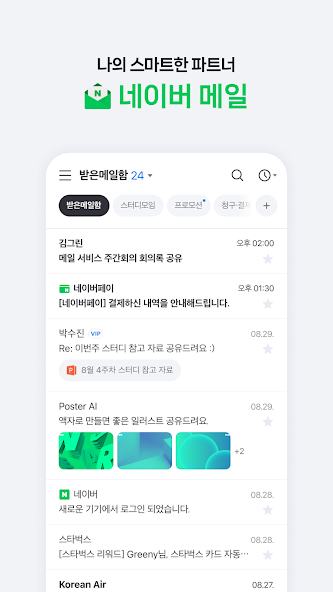
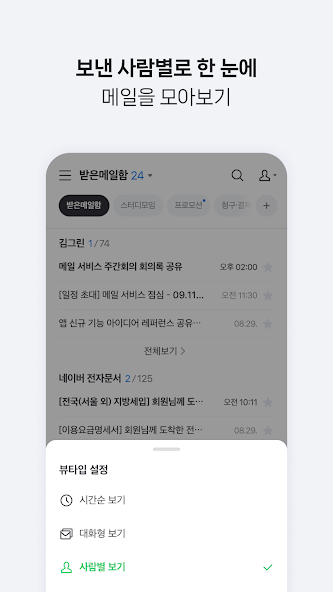
1. Easily find the mails you want.

· You can group and view the mails collected in chronological order by conversation or person.

· Use the filter feature to quickly group unread mails/important mails/mails with attachments/VIP mails.

· You can separately view promotion mails, invoice/payment mails, and mails from social media services or NAVER Café, which are automatically classified to the smart mailbox.

· The NAVER Mail app allows you to view and manage your frequently used external mailing accounts, such as Gmail and Outlook.

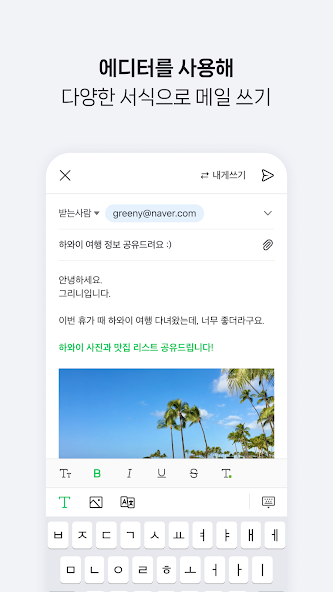
2. Write smart emails on the app.

· Use bold/underline/colored fonts to emphasize important words, and insert images in your mail body.

· You can attach and send files uploaded to your MYBOX.

· Use the translation feature to write mails in foreign languages hassle-free.

3. Safeguard your mail.

· We will detect and inform you in advance of files with viruses/malicious codes before attaching/downloading them.

· Use the password lock to keep your mail app safe.

Please contact NAVER Customer Center ( http://naver.me/5j7M4G2y ) for any issue or inquiry while using the app.

■ Details of Mandatory Access Authorization

· Contact information (Contact list) : Bring the email contact information stored on the contact list of your device to write mails, or use NAVER’s simple login (only for devices below OS 6.0).

· Notifications : You can receive notifications for new mails, mail delivery failure messages, etc. (Only for devices running on OS 13.0 or up)

· Images and videos (file, media, or storage) : You can attach image and video files taken with your camera or stored on the device’s gallery app to an email. (However, not available when using the NAVER Mail app v3.0.5 on devices with OS version 10.0 or higher.)

What's New in the Latest Version 3.0.5

Last updated on Nov 29, 2024 Meet the new NAVER Mail app.
- Improved screen design
- Dark mode supported
- Favorite mailbox feature added
- Smart mailbox added
- New feature to increase the font size in the mail body
- Preview attachments from the mail list
- Writing editor (formatting options, inserting images to email body, translation)
- Mailbox management feature added
Download(81.67MB)
Users also viewed
  • Call Plus One

    Call Plus One

    2.25 March 3, 2026
  • My Umniah

    My Umniah

    1.2 March 3, 2026
  • jomjom

    jomjom

    1.3.7 March 2, 2026
  • Talk Chat - Messenger

    Talk Chat - Messenger

    0.1 March 2, 2026
  • Mature Dating

    Mature Dating

    6.7 March 2, 2026
  • Christian Singles: Jesus Chat - Christian Dating

    Christian Singles: Jesus Chat - Christian Dating

    6.0 March 2, 2026
  • V Love

    V Love

    3.0.3 March 2, 2026
  • Image Quotes

    Image Quotes

    1.0 March 1, 2026
  • Spikko

    Spikko

    2.1.2 March 1, 2026
  • Gigi

    Gigi

    2.25.1 March 1, 2026
  • Mazel Match

    Mazel Match

    1.65 February 28, 2026
  • Burn Note

    Burn Note

    1.63 February 28, 2026
  • Video chatroulette Eva

    Video chatroulette Eva

    170.130.2 February 27, 2026
  • BEL0900

    BEL0900

    1.1.004 February 27, 2026
  • Ethio Telecom App

    Ethio Telecom App

    3.5.0.2 February 26, 2026
About Privacy Policy Terms of Service Cooking Policy

© Copyright 2017-2026 downzr.com