



myVault: Keep what’s yours, yours.
myVault: Keep what’s yours, yours. Now, one of the best mobile security and privacy
apps available for free! Private photos, passwords, credit cards, contacts, reminders
and more! Download myVault today to receive all of these features and more:
Brute-force Entry Protection – Users attempting to break into the app by entering
rapid random number combinations will be deterred by a wait time after multiple
failed attempts.
Multitasking Lock – The instant someone exits myVault, a passcode is required to
reenter. In multitasking view, a privacy screen is shown to prevent users from
viewing the app without entering a passcode.
Private Photos – Upload photos to myVault via your camera gallery or take a photo
directly within the app. These photos can only be accessed through myVault.
Secret Bookmarks/Private Browser – Add the bookmarks to all of your favorite
sites. Additionally, you can visit any of your bookmarks directly from myVault’s
private Internet browser.
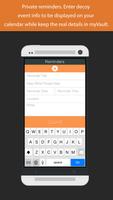
Secret Reminders – Enter in your reminder name, time, location, and any other info
then simply enter a name for your reminder to appear as on your phone’s calendar.
Your phone will give you alerts displaying the decoy name so only you’ll know what
that reminder is actually for.
Hidden Contacts – Enter in the name and phone number of anyone you like. You can
call them right from the app and only their number shows up in your “recent calls”
list. Simply delete that call and you’re good to go, your contact in myVault will still
be there waiting for you.
Private Notes – Write notes directly in myVault or copy/paste them over.
Credit Cards – Enter and store credit card information for multiple credit cards.
Health Insurance – Save your or your family’s health insurance information.
Social Security – Save your or your family’s social security information.
Accounts – Save multiple business account numbers.
Download myVault today and you’ll receive one of the top mobile data security and
privacy apps. We are constantly updating myVault, so expect some big features
coming soon!















 Download