


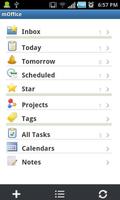
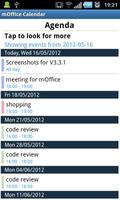
mOffice offers calendar, task,note, contact and synching with Microsoft Outlook®
Mobisynapse mOffice is a full-suite productivity app on Android® device. mOffice offers calendar, task, note, contact, reminder functionality. It also supports GTD task workflow. Mobisynapse mOffice does NOT require Microsoft Exchange server®, it connects to the Microsoft Outlook® on the PC through USB or WiFi for synching, with an optional Mobisynapse desktop manager PC software which is sold starting at $14.99.
Are you a GTD warrior? Do you want to keep your calendar/to-do/contact organized and to be more productive with your Android phone? Do you want to take Microsoft Outlook® contact/calendar/task/note/reminder data with you wherever you go? if the answer is YES, Mobisynapse mOffice is the app for you.
What people say about Mobisynspe mOffice:
--"Must have software if you have an Android phone" by Kristine
--"If you want to sync Android phone with Outlook®, mOffice is the best and cheapest!" by Paul
--"Nice GTD app on Android phone" by Ricky
--"Take all my Outlook® contact/task/calendar/note data with me on my phone with bidirectional synching, nice!" by Andrew
Main features:
--Full-suite productivity apps: calendar, task, note, contact and reminder
--Support event/task/note home screen widget:
--Support Outlook® contact, calendar, task, note and reminder sync with optional Mobisynapse desktop software.
--Support Microsoft Outlook® multiple contact/calendar/notes multiple folders synching
--Support Microsoft Outlook® categories synching
--Support selected folders/categories synching from Microsoft Outlook®
--Support the note, birthday, photo, prefix/suffix, nick name, web site etc fields in Microsoft Outlook® contact synching
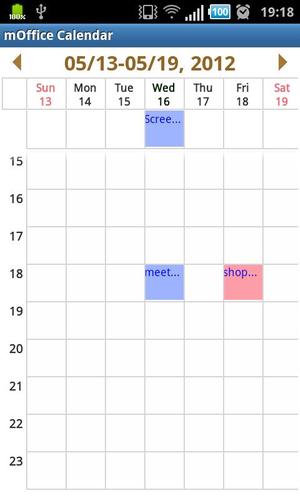
--Multiple calendar views: daily, weekly and monthly
--GTD task workflow
--Support recurring task/event
--Support task/event reminder
--Integrate with build-in Android contact, SMS and Email apps
--Quick-add and Voice-add task/event
--Sort and search feature
--Support Call, SMS and Email task types
--Support project/task grouping
--Support note feature
--Support scan and connect feature in WiFi connection
Mobisynapse desktop software also offers the functionality as Android desktop manager. Here are the main features:
--Back up and restore apps and SMS
--Transfer files between the PC and Android phone
--Sync iTunes playlists between the PC and Android phone
--Receive/send SMS from the PC
--Sync photos/music/videos between the PC and Android phone
--Install/un-install apps from the PC to Android phone
mOffice could be used as a standalone Android CRM and productivity app without Mobisynapse desktop software. Or Mobisynapse can be paired with the premium version of Mobisynapse, Android desktop manager, to sync calendars, tasks, contacts, notes and reminders between Android devices and Microsoft Outlook®. Mobisynapse, Android desktop manager is sold separately starting at $14.99. We are so confident that we offer you 30 days no-hassle, no-question-asked MONEY BACK guarantee for your purchase!
For more detail, please check out Mobisynapse, Android desktop manager at:
http://www.mobisynapse.com/android-outlook-sync/android-desktop-manager.html
Import note: If you have any issue synching from mOffice to Outlook on your PC, please submit a tech support or send a support email, before you give a negative review here. Most of time, our tech support should be able to help you to get the issue resolved. Thank you, we appreciate it.
Disclaimer: Mobisynapse mOffice is developed by an independent software developer. It is not associated with Microsoft. Outlook® is Microsoft registered trademark product.




 Download