

Number one GPSGate client! New GPS/Cell Engine based on activities and free!
GPSTrackerGate Free is an application that collects positions on a Schedule/movement and in a new way!.
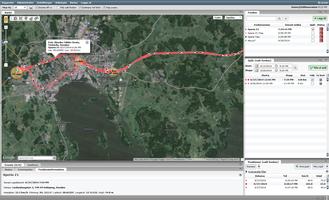
The positions is saved to the local storage on the phone. Positions can also be sent to a GPSGate server that shows the positions on a map or in reports.
Positions is sent to the server automatic (if configured). And if no data network is available the positions is saved on the mobile storage until a data network is available.
Other names on this type of application is GPS Tracker, GPS Logger or GPSGate client.
More information about server software at http://www.gpsgate.com
This application can be used to track vehicles or persons with android phones.
Features:
- Auto start service to collect positions after restart of the phone or when application is closed.
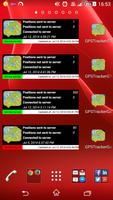
- Widget included that displays position information.
- Only send positions to the server when on a Wi-Fi network (all Wi-Fi networks or a specific).
- Vibrate when uploading positions on Wi-Fi.
- Display notification when uploading positions on Wi-Fi.
- Only collect positions when mobile is connected to external power.
- Show you’re positions on a map in the application.
- Debug log that can be displayed and sent.
- Position statistics per day.
- Automatic cleaning of local position storage.
- Do not delete unsent positions.
- Setting to define a positions accuracy before saving.
- Setting to define how much movement that is required before a position is saved.
- SMS remote control.
- Use cell tower position instead of GPS.
- Verify server settings against the server.
- UDP transport of position data.
- Send battery level to GPSGate server (Not in free version).
- Send activity information to GPSGate server (Not in free version).
- Send dispatch jobs from server to app! (Not in free version).
- Chat with operator! (Not in free version).
- Custom buttons now in application! Configure them to do what you want! (Not in free version).
- Brand the application by changing information in the app (Not in free version).
- Use a code to enter settings or turn off/on position collecting (Not in free version).
- Take photo and send to predefine email address (Not in free version).
- Save positions based on activities like walking, still, in vehicle etc (Not in free version).
- Send SOS to server (Not in free version).
Configure GPSTrackerGate to send locations to GPSGate server:
- Start application.
- Click on Settings button (Menu).
- Select Upload position data.
- Fill in IP or DNS address to the GPSGate server in GPSGate Server.
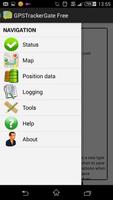
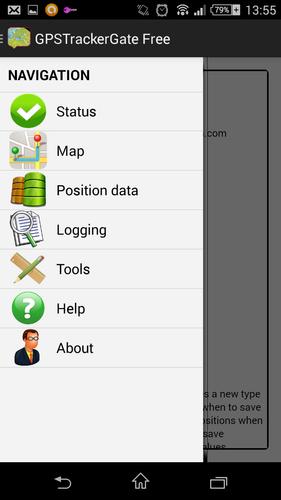
- Slide out the menu from the left and select Tools.
- Click verify server communication button.
- Click Get data to verify and then send command to server to pre stage the device on the GPSGate server.
- Login to Site Admin
- Click on “Devices” tab in Site Admin
- If the device is sending data you will see “x unknown device”
- Click on “x unknown device” button
- Enter the information needed to assign the device to a new user and select the application the user will be added to.
- Login to the application and you will see the device on line
SMS Control/Configuration by using the following SMS commands:
Send GPSTrackerGate send to get a SMS with the device position.
Send GPSTrackerGate start to start collecting positions.
Send GPSTrackerGate stop to stop collecting positions.
Send GPSTrackerGate conf... to configure settings in the application.
More information about SMS commands in the application help or http://www.softinnovation.com.
Application language in English, German, French, Dutch, Spanish, Portuguese (Brazil) or Swedish.
- German language added by STefan Mayer.
- Dutch language added by Maarten van Roosmalen/Ebo Eppenga.
- Spanish language added by Ramón Resendiz.
- French language added by Raji Jaafar.
- Portuguese Brazil added by Roberto Dias.
Send me a mail if interested in beta testing or helping translate the application to other languages.








 Download