• Home
  • Games
    Action-adventure Simulation Business Role Playing Sports Competition Casual Intelligence Card Strategy Music Rhythm Text Puzzle Flying Shooting Love Development
  • Apps
    Business Office Newsletter Social Life Entertainment Online Shopping Practical Tools Travel Financial Management Educational Learning Information Reading Sports and Health
  • Articles

English 中文(简体) 中文(繁体) 한국어 日本語 Português Español Русский العربية Indonesia Deutsch Français ภาษาไทย
Home Apps Practical Tools GO SMS Pro Theme marijuana
GO SMS Pro Theme marijuana

GO SMS Pro Theme marijuana

1
2
3
4
5
Download
  • Version 2.8
  • Category Practical Tools
  • Package Name com.gosms.workshoptheme.theme
  • Update Time April 17, 2025
  • Size 4.86MB
About this app

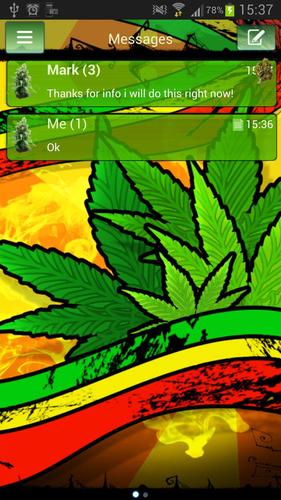
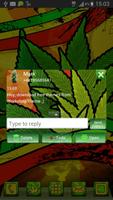
If you like the color green, or you are a rasta rastafari, try a free theme!

GO SMS Pro Theme marijuana only works with GO SMS Pro, if you do not have it, download for free from Google Play.

This topic is for all rastaman on a green planet. In this project, we presented our vision of a bright green and yellow, red smoke from smokers in the world. Install it and feel the love of the grass. See how marijuana seems to live in colorful tones. Do you love colored smoke, you smoke a joint, water bong, cigar or cigarettes? If You like smoked weed, smoke ganja, cannabis, or you like reggae you should download this theme. :) Feel like a real rastaman every time when you see on the mobile device of beautiful clouds of smoke!

The theme marihuana is very optimistic full of positive emotions.

To apply the motive and enjoy the beautiful wallpaper (also for GO Chat):

1. Download this motif from Google Play for free

2. Download GO SMS Pro for free

3. Install and launch GO SMS app

4. Press - theme

5. Click - Mine

6. Tap the GO SMS Pro Theme marijuana

To personalize appearance settings about conversation list

1. Go to messages Menu

2. Press message Advanced options

3. Click Appearance Settings.

4. Press Conversation List Customization

And now You can adjusted for each other:

- Background in messages.

- Displayed contact pictures.

- Contact font.

- Or reset this setting as to default.

To change appearance settings about conversation style

1. Press Menu

2. Go to Advanced

3. Click Appearance Settings.

4. Press Conversation customization

If you want to use avatar icon for any contact simply change it and the new image fuchsia for each contacts are visible on conversation list and messages sms list.

Disclaimer: this application use interstitial ads and banners.

Check other our GO SMS Pro Themes, GO Locker Themes, and GO Launcher EX, free themes. Themes are published all the time, so remember to check our developer account regularly.

Style was created by WorkshopTheme.
What's New in the Latest Version 2.8

Last updated on Jun 27, 2016 fixes bug
Download(4.86MB)
Users also viewed
  • on the sea go launcher theme

    on the sea go launcher theme

    1.2 March 3, 2026
  • Keep It Secure

    Keep It Secure

    1.3 March 3, 2026
  • Desain Pintu Rumah 2018

    Desain Pintu Rumah 2018

    5.0 March 3, 2026
  • Wedding Photo Album

    Wedding Photo Album

    1.0 March 3, 2026
  • mySF. For everything smartfren

    mySF. For everything smartfren

    7.34.0 March 2, 2026
  • Slideshow video editor

    Slideshow video editor

    1.5.1 March 2, 2026
  • I believe in you go launcher

    I believe in you go launcher

    1.2 March 1, 2026
  • Photon. Photoeditor with text,

    Photon. Photoeditor with text,

    Artemy Strelov March 1, 2026
  • GO Locker Theme Pink Cute Rose

    GO Locker Theme Pink Cute Rose

    5.3 February 28, 2026
  • (FREE) Mice Gaming GO Locker

    (FREE) Mice Gaming GO Locker

    1.0 February 28, 2026
  • BAF MET- BAF Weather Forecast

    BAF MET- BAF Weather Forecast

    1.6 February 28, 2026
  • Fast Launcher

    Fast Launcher

    2.0.1 February 28, 2026
  • MOLDIV

    MOLDIV

    3.5.1 February 28, 2026
  • Wild Leopard Lite

    Wild Leopard Lite

    1.6 February 28, 2026
  • Happy apple icon theme

    Happy apple icon theme

    1.0 February 27, 2026
About Privacy Policy Terms of Service Cooking Policy

© Copyright 2017-2026 downzr.com