• Home
  • Games
    Action-adventure Simulation Business Role Playing Sports Competition Casual Intelligence Card Strategy Music Rhythm Text Puzzle Flying Shooting Love Development
  • Apps
    Business Office Newsletter Social Life Entertainment Online Shopping Practical Tools Travel Financial Management Educational Learning Information Reading Sports and Health
  • Articles

English 中文(简体) 中文(繁体) 한국어 日本語 Português Español Русский العربية Indonesia Deutsch Français ภาษาไทย
Home Apps Practical Tools Floating Info
Floating Info

Floating Info

1
2
3
4
5
Download
  • Version 2.1
  • Category Practical Tools
  • Package Name uk.co.alt236.floatinginfo
  • Update Time November 28, 2025
  • Size 1.94MB
About this app

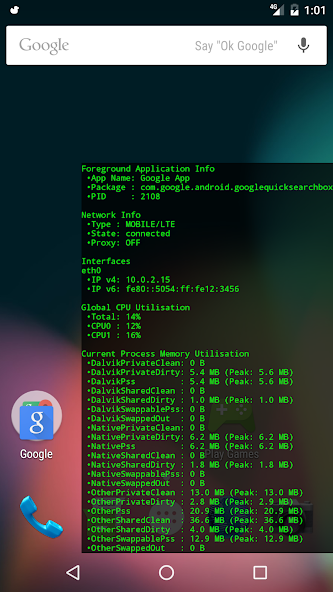
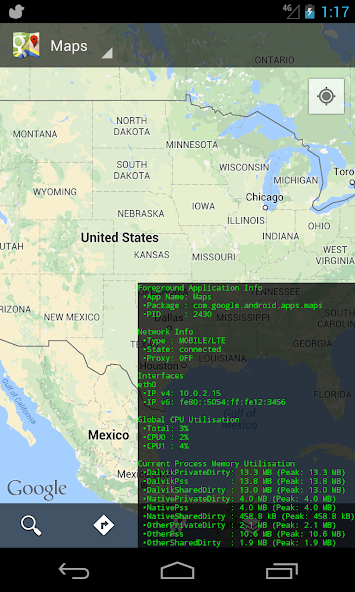
Show information about the currently foregrounded app and the OS as an overlay.

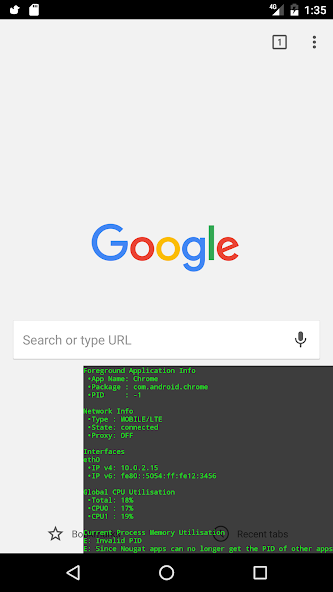
Fun fact: Since Android Nougat apps cannot get the PID of other apps. This makes displaying the Memory info for apps other than Floating Info itself impossible. All other functionality will still work.

Floating Info is an Android application that displays the following in a system overlay window:

The application name, package name and process id (except on Nougat+) of the application which is currently in the device's foreground

The Global CPU utilisation with a per-core breakdown - This is not foreground application specific.

Memory usage breakdown for the currently foregrounded process - except on Nougat+ (read the notes for the caveats).

Netork information like connection type, proxy status and IP address(es). Both IPv4 and IPv6

Notes and Caveats

---

* The application will show the memory allocation of the currently foregrounded process which it gets by getting the Process Id of the currently foregrounded activity. This means that if an application has spawned multiple processes, this application will only show the memory utilisation of the main process.

* The Memory information displayed come via a Debug.MemoryInfo object, while using reflection to expose a number of hidden fields.

* Data updates happen approximately every 1 second.

Android Memory Usage

---

Memory management on Android is pretty complex and the easiest way to get started with understanding it is reading this article (https://developer.android.com/tools/debugging/debugging-memory.html) - especially the "Viewing Overall Memory Allocations" section.

GitHub Link: https://github.com/alt236/Floating-Info---Android
What's New in the Latest Version 2.1

Last updated on Nov 28, 2017 v1.0: First public release
v2.0: Conversion to Android Studio, Lollipop support, network info, onboarding
v2.1: Added Locale info, Oreo support
Download(1.94MB)
Users also viewed
  • Kurdish Weather

    Kurdish Weather

    1.1.5 January 15, 2026
  • AirVista

    AirVista

    4.1.0 January 14, 2026
  • Summer GO Launcher Theme

    Summer GO Launcher Theme

    v1.0 January 13, 2026
  • Emoji Keyboard-Waterdrop

    Emoji Keyboard-Waterdrop

    1.0.0 January 13, 2026
  • Character Exo ShortCut

    Character Exo ShortCut

    1.0 January 13, 2026
  • AI Photo Editor, Collage-Fotor

    AI Photo Editor, Collage-Fotor

    7.6.19.2 January 13, 2026
  • At&t Payment go phone refill

    At&t Payment go phone refill

    0.1 January 12, 2026
  • Application Auto Starter

    Application Auto Starter

    1.0 January 12, 2026
  • GMS VersionUpList

    GMS VersionUpList

    3.5 January 12, 2026
  • Minimalist Weather

    Minimalist Weather

    1.2 January 12, 2026
  • Better DashClock Widget

    Better DashClock Widget

    1.5.0-Android 5.x+ January 12, 2026
  • FingerCMS

    FingerCMS

    1.11.21 January 12, 2026
  • Limousine Car Wash Simulator

    Limousine Car Wash Simulator

    0.9 January 11, 2026
  • Live UV Australia

    Live UV Australia

    1.0.1 January 11, 2026
  • Print Studio

    Print Studio

    2.3.2 January 11, 2026
About Privacy Policy Terms of Service Cooking Policy

© Copyright 2017-2026 downzr.com