
• Home
  • Games
    Action-adventure Simulation Business Role Playing Sports Competition Casual Intelligence Card Strategy Music Rhythm Text Puzzle Flying Shooting Love Development
  • Apps
    Business Office Newsletter Social Life Entertainment Online Shopping Practical Tools Travel Financial Management Educational Learning Information Reading Sports and Health
  • Articles

English 中文(简体) 中文(繁体) 한국어 日本語 Português Español Русский العربية Indonesia Deutsch Français ภาษาไทย
Home Apps Practical Tools Dr. Booster
Dr. Booster

Dr. Booster

1
2
3
4
5
Download
  • Version 2.0.1077
  • Category Practical Tools
  • Package Name com.trendmicro.dr.booster
  • Update Time May 3, 2026
  • Size 50MB
About this app

Best Android game speed booster that speed up your Android game apps for free!

Dr. Booster smartly frees up memory space (RAM) to boost your phone, speed up Android game apps, and detect malware, so your favorite games—as well as over 70,000 other apps—run faster and smoother!

★ Downloaded more than 10 million times globally ★

★ The no. 1 most downloaded pure game booster worldwide ★

★ Ranked among Google Play’s 2016 Top 10 Free Tool Apps in for 8 consecutive weeks in Japan! ★

★ Highly rated at 4.4 stars by 100,000 users ★

Key features: (2 NEW features)

★ NEW Direct Boost: launch your favorite game apps and powerfully boosts their speed performance with a touch of our floating boost button. It doesn’t get any faster than this! [supported by Android 5.0 and above only)

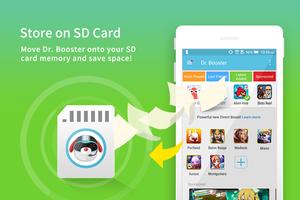
★ NEW Store on SD Card: not enough storage space on your mobile? No problem, move Dr. Booster onto your SD card memory to save space!

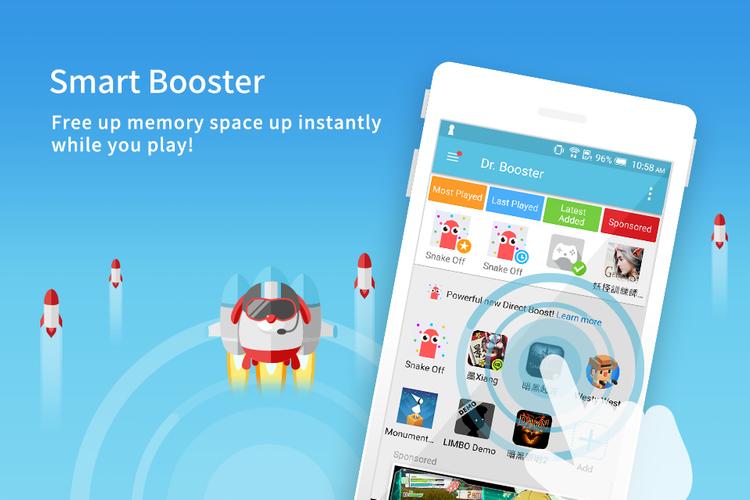
★ Smart Booster: boosting speed performance in real-time and smartly frees up memory space while you play.

★ Antivirus Scan for New Apps: automatically adds your newly downloaded apps to Dr. Booster and scans for malware!

★ Flexible Organization: customize and arrange your game apps however you want by pressing and dragging app icons, easy!

Suitable For:

• Mobile phones that lag when you’re playing games

3 Simple Steps:

Step 1: Download Dr. Booster.

Step 2: Games and apps are automatically loaded inside, customize your organization.

Step 3: Open up your game and press our floating boost button to experience a turbo-speed boost!

Dr. Booster - Boost Game Speed supports 10 languages, including English, Mandarin Chinese (Traditional), Bahasa Indonesia, Thai, Vietnamese, Spanish, Russian, Portuguese, Turkish, and Japanese.

[Terms and Condition] Activating Dr. Booster means you understand and accept the terms of service for this application. Read them here http://soocii.net/privacy%20policy/

[Android 5.1.1] For Android 5.1.1 users, permission is needed for Dr. Booster to boost your devices.
What's New in the Latest Version 2.0.1077

Last updated on May 15, 2018 Version Update 2.0.1076
- Minor bug fix
Download(50MB)
Users also viewed
  • Web Clip

    Web Clip

    1.00.02 July 16, 2026
  • Flashlight (Ad-Free)

    Flashlight (Ad-Free)

    1.2 July 15, 2026
  • Termux

    Termux

    googleplay.2025.01.18 July 15, 2026
  • Gorilla Unit Converter

    Gorilla Unit Converter

    2.0 July 15, 2026
  • Desain Hiasan Dinding Rumah Idaman

    Desain Hiasan Dinding Rumah Idaman

    1.2 July 15, 2026
  • Spy Camera(Remotely)

    Spy Camera(Remotely)

    3.6 July 15, 2026
  • Blow Soap Bubbles LWP

    Blow Soap Bubbles LWP

    1.1 July 14, 2026
  • Irdroid

    Irdroid

    0.4 July 14, 2026
  • F22 Raptor Air Combat HD LWP

    F22 Raptor Air Combat HD LWP

    1.2 July 13, 2026
  • Biscuit icecream icon theme

    Biscuit icecream icon theme

    1.0 July 13, 2026
  • Fire Flower

    Fire Flower

    1.1.5 July 13, 2026
  • Mobile Security Virus Test

    Mobile Security Virus Test

    1.4 July 13, 2026
  • 3D Clock DENMARK FLAG LWP

    3D Clock DENMARK FLAG LWP

    1.0 July 12, 2026
  • Speedometer Cars Clock Live Wa

    Speedometer Cars Clock Live Wa

    1.12 July 12, 2026
  • Designing analog clock-No04

    Designing analog clock-No04

    1.3 July 11, 2026
About Privacy Policy Terms of Service Cooking Policy

© Copyright 2017-2026 downzr.com