

Be always on time, never miss a second.
☆ ROOT is REQUIRED for automatic synchronization ☆
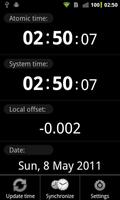
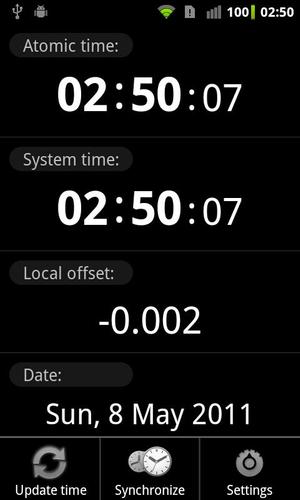
ClockSync synchronizes device system clock with atomic time from Internet via NTP (Network Time Protocol).
Useful if provider doesn't support NITZ, sends incorrect time or if your device/ROM has heavy clock drift.
There are 2 modes: automatic for root users and assisted manual mode for users without root (rootless mode).
Rootless mode features:
- automatic atomic time retrieval with configurable interval
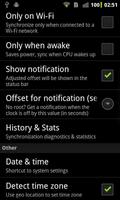
- notification when offset exceeds user set threshold
- assisted manual synchronization with the hint what time/date to set
- precision between 1 and 30 seconds (because Android doesn't allow to set seconds)
- 1 second precision if your device resets seconds on Set (most Samsung and some HTC devices)
- Greenwich Time Signal assisted sync if device resets seconds
Root mode features:
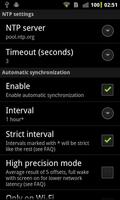
- automatic sync with configurable interval
- accuracy is ~1-20ms depending on your connection and NTP server
- statistics (average drift per day, total time corrected)
Root is required because of Android security restrictions (user apps cannot set time).
Other features:
- customizable NTP/SNTP server and timeout
- displays current date or time since last sync
- NTP server details dialog
- 3 color schemes (dark, light, default)
- 12-hour or 24-hour clock format
- time zone detection and adjustment based on geo location
- system time zone override with custom offset
- time zone management based on latest Olson tz database (zoneinfo)
- optional haptic feedback and sync notification
- clean and easy to use interface (tap screen values or use menu)
Don't have root? See http://bit.ly/phoneroot for the detailed instructions.
Don't want or can't root your device? You can still use ClockSync as your precise time source to adjust your watch or other clocks, or to verify how accurate your cell time is, or set time manually in rootless mode.
Move to SD is disabled because automatic synchronization (timers) will not work when app is moved, also app size is very small and since not all files are moved to SD in any case, it would not save you more than 50Kb.
If you get wrong time after synchronization, your phone time zone data is out of date, use http://bit.ly/tzupdate to fix it.
Issues, questions or suggestions? Please e-mail me, developers have no way to respond to Market comments.
I reply to every e-mail within one day maximum (usually instantly).
See http://bit.ly/ClockSync for more information.
Google+ Community: http://bit.ly/cs-plus
Permissions explained for paranoid users:
- RECEIVE_BOOT_COMPLETED: used only for "Sync on boot" option
- VIBRATE: optional haptic feedback on tap and sync
- INTERNET: to get time from NTP servers, to get time zone from web services
- WAKE_LOCK: to perform background synchronization without being killed in the middle by the OS
- ACCESS_NETWORK_STATE: to sync only when network is available
- ACCESS_FINE_LOCATION: to get best location for time zone from location feature when GPS is on
- ACCESS_COARSE_LOCATION: if GPS is off, network location is used
- SET_TIME_ZONE: to automatically set time zone depending on location or for manual override
- SYSTEM_ALERT_WINDOW: new permission since 1.1.5, used for transparent overlay in rootless mode to show countdown updated every second
- ACCESS_SUPERUSER: for compatibility with SuperSU and Superuser applications, see http://bit.ly/su-permission




 Download