

It's your weather, why not use it?! Realtime Weather App for BTST Clients
Weather App that displays LIVE weather data from participating organizations.
btstWx Participating client organizations are provided a private Access Code for app usage. Once entered, btstWx will auto-connect to the live weather data feed(s) of that organization. btstWx is branded with the organization's name & logo to help promote their business to their clients.
btstWx offers 3 views of the live weather data.
View 1: Compass View
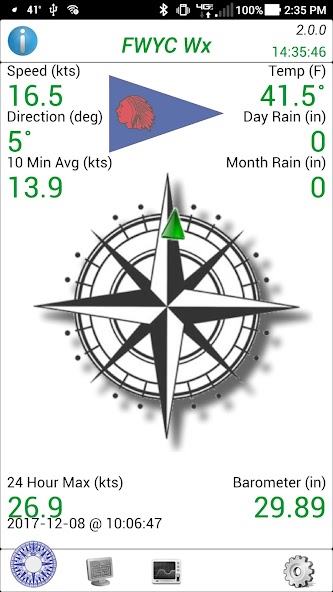
This view provides an analog compass showing wind direction, along with numeric readouts around the compass of weather data: Wind Speed in knots, Wind Direction in degrees, 10 Minute Wind Speed Average, Temperature, Daily Rain amount in inches, Monthly Rain amount in inches, Barometer and 24 Hour Max Wind Speed in knots.
View 2: Table View
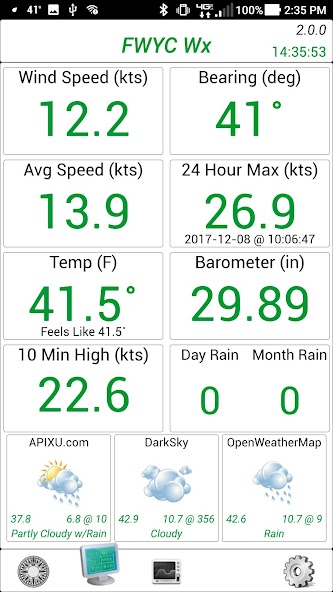
This view provides the same weather data, but in a table format. Also included are three forecast icons representing the upcoming weather. Forecasts are provided by 3-rd party forecast services.
View 3: Graph View
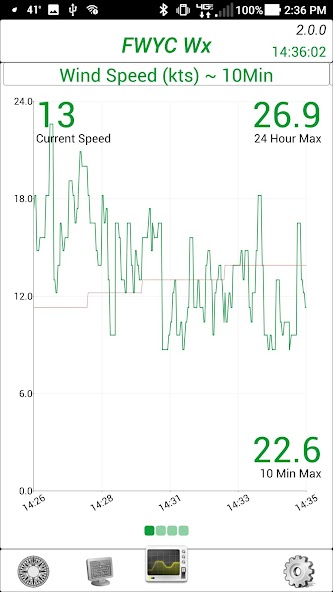
This view displays 4 graphs. Each graphs displays a 10 minute historical view of weather data: Wind Speed (kts), Wind Bearing (deg), Temperature (F) and Barometer (inHg). Graph data is updated live, as the app receives data from the BTST Wx Server. For WeatherFlow SWS users, the graphs show data from the past hour (60 minutes).
If the organization has multiple weather stations providing data to the btstWx app, the user can switch between weather stations using the Windsock icon. Once selected, a list of available weather stations is provided. Selecting one from the list displays the particulars about that station, and allows the user to 'Subscribe' to it's data feed.
btstWx has three themes. A white theme (default), a light theme, and a dark theme. To switch between them, select the Gear icon and tap the 'Switch Theme' button.
When restarting, btstWx will connect to the last selected Weather Station data feed and will use the last selected theme (or the white theme as a default).
If you would like to have your organization's weather station added to the BeenThereSailedThat client list, and get your dedicated access code, please contact us at: [email protected].






 Download