

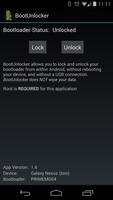
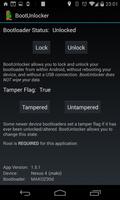
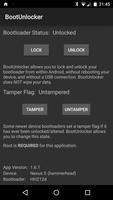
On most pre-2014 Nexus devices, unlock your bootloader without fastboot!
This application REQUIRES a Galaxy Nexus (GSM, Verizon, or Sprint), Nexus 4, Nexus 5, Nexus 7 (2013), Nexus 10, or OnePlus One with root.
Nexus 6 and newer devices contain security measures in their bootloaders, connected with factory-reset protection. These measures make it very difficult to use root to lock/unlock the bootloader, and as a result it is unlikely that Nexus 6, Nexus 9, Nexus 5X and Nexus 6P will ever be supported.
-------------
You've rooted your device, and you are trying to decide between the security of relocking your bootloader (with stock recovery and USB Debugging off), and the flexibility of leaving it unlocked.
You know that in order to prevent an unauthorized user from accessing your data by flashing a custom recovery, "fastboot oem unlock" wipes your data. This also means that if you relock your bootloader, you will need to do a full backup-and-restore whenever you decide to unlock it again.
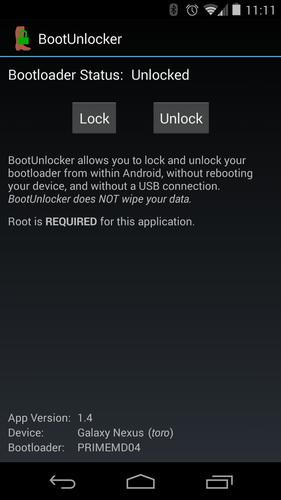
BootUnlocker for Nexus Devices lets you have the best of both worlds by using root privileges to unlock your bootloader from within Android, without wiping your data. This allows you to keep your bootloader locked for security, with this application safely protected behind your lockscreen password. Whenever you want to unlock or relock your bootloader, just unlock your screen and run BootUnlocker.
License:
--------
BootUnlocker for Nexus Devices_ is Open Source Software, licensed under the Apache License, Version 2.0: http://www.apache.org/licenses/LICENSE-2.0.html
Source code is available on Google Code: https://code.google.com/p/boot-unlocker-gnex/
Unless required by applicable law or agreed to in writing, software distributed under the License is distributed on an "AS IS" BASIS, WITHOUT WARRANTIES OR CONDITIONS OF ANY KIND, either express or implied. See the License for the specific language governing permissions and limitations under the License.
Support:
--------
For support, you can:
* Open an issue on Google Code
* Join this app's discussion on XDA: http://bit.ly/BootUnlocker
* Email the developer





 Download