• Home
  • Games
    Action-adventure Simulation Business Role Playing Sports Competition Casual Intelligence Card Strategy Music Rhythm Text Puzzle Flying Shooting Love Development
  • Apps
    Business Office Newsletter Social Life Entertainment Online Shopping Practical Tools Travel Financial Management Educational Learning Information Reading Sports and Health
  • Articles

English 中文(简体) 中文(繁体) 한국어 日本語 Português Español Русский العربية Indonesia Deutsch Français ภาษาไทย
Home Apps Educational Learning Avanti Mobile Assist
Avanti Mobile Assist

Avanti Mobile Assist

1
2
3
4
5
Download
  • Version 5.14.1
  • Category Educational Learning
  • Package Name com.avanti.mobileinstaller
  • Update Time May 31, 2026
  • Size 9.9MB
About this app

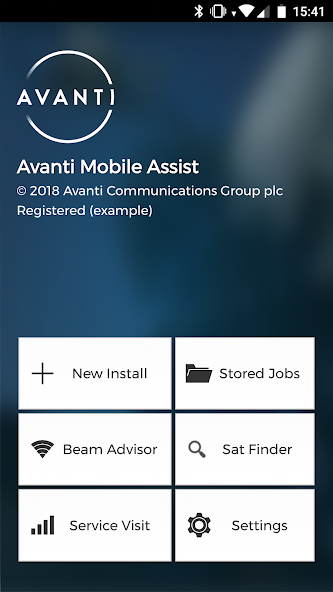
AMA increases installation efficiency of satellite broadband terminals.

Avanti are pleased to introduce our latest product to assist with Ka-band satellite field installations – the Avanti Mobile Assist Android app. This app allows all stages of a standard Hughes installation to be carried out using only an Android smartphone with the help of built-in sensors. This eliminates the requirement for:

• Horizon satellite meter

• Laptop

• External GPS unit

• Compass/Inclinometer

• Camera (for reporting)

The Avanti Mobile Assist app allows you to perform:

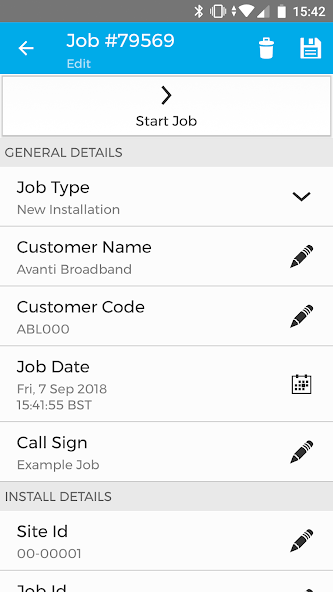
• Install job management – download (WiFi / 3G), scan (QR code) or receive (SMS) install jobs directly to phone with necessary equipment, beam configuration, location and contact details.

• Satellite modem configuration – configure Hughes terminals via WiFi connectivity by connecting an off-the-shelf WiFi router / access point to the satellite modem.

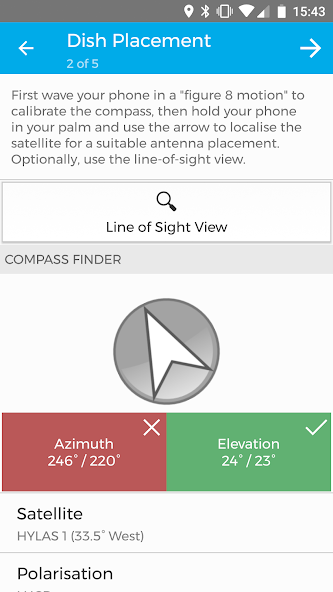
• Dish placement – using built in GPS, compass and accelerometer / gyroscope to calculate and display the location of the satellite on-screen, using either a compass view or “Augmented Reality”.

• Dish alignment – carry out fine alignment of the antenna over WiFi, using the built in beeper tool, without the need of a satellite meter.

• Service Test – run network IP & DNS connectivity, latency, download and upload speed tests of the commissioned service

• Reporting – report details of the install directly from the phone by taking photos of the site with the built in camera and use the barcode scanner to store equipment serial numbers. All reports are uploaded to the OSS via the commissioned internet connection.

The only device an installer needs is 1) an off-the-shelf wireless access point / router and 2) an Android smartphone.

Please report any feature request or bug report to: [email protected]
What's New in the Latest Version 5.14.1

Last updated on Oct 7, 2024 * Fixed Time Slice selection
* Fixed issue with Capricorn-4 S2X connectivity
* Fixed crash during Gilat pointing screen
* Fixed crash on job activity screen
* Fixed and improved terminal commissioning and configuring process
Download(9.9MB)
Users also viewed
  • Words For Kids

    Words For Kids

    1.1.0 May 30, 2026
  • SME Management

    SME Management

    1.6.1 May 29, 2026
  • Balli Shastra

    Balli Shastra

    1.1 May 29, 2026
  • Hiragana / Katakana Test

    Hiragana / Katakana Test

    2.0.0 May 26, 2026
  • TROY

    TROY

    2.6 May 26, 2026
  • Cerita Anak : Kota Salatiga

    Cerita Anak : Kota Salatiga

    5.0.1 May 26, 2026
  • Panchatantra

    Panchatantra

    1.5 May 25, 2026
  • Guardian 360

    Guardian 360

    2.5 May 25, 2026
  • McGraw-Hill Education LSAT

    McGraw-Hill Education LSAT

    1.2.0 May 25, 2026
  • Iqro Digital

    Iqro Digital

    1.2 May 24, 2026
  • Tennessee DMV

    Tennessee DMV

    6.0.6 May 23, 2026
  • MRC Global

    MRC Global

    2.7.3 May 23, 2026
  • 1C:Small Business Mobile

    1C:Small Business Mobile

    3.0.5 May 23, 2026
  • Lakshya GK : UPSC,SSC,SBI,IBPS

    Lakshya GK : UPSC,SSC,SBI,IBPS

    15 May 22, 2026
  • Insperity Event App

    Insperity Event App

    1.3 May 22, 2026
About Privacy Policy Terms of Service Cooking Policy

© Copyright 2017-2026 downzr.com