

Enjoy millions of the latest Android apps, games, music, movies, TV, books, magazines & more. Anytime, anywhere, across your devices.
Auto Manager will help you track your costs and maintain your auto in its best condition.
Auto Manager Free takes care of a major part, your fuel costs,
Please report all error to [email protected]
I will fix very quickly and re-publish.
Auto Manager gives you a very simple and straight forward user interface so even those who are not auto savvy can use it efficiently and understand its output.
Free Version Features:
• Supports a single Auto
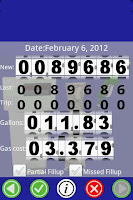
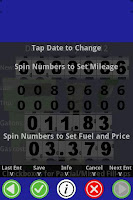
• Easy to enter fill-ups using Spin Dials
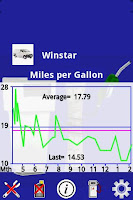
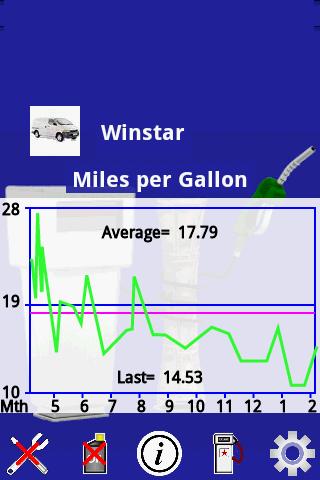
• Graphs for Miles per Gallon, Cost per Mile, Cost per Week and Fuel Cost
• Support for Partial or Missed fill-ups
• Allows editing past fill-ups
• Backup and Restore data on SD card
• Backup data in CSV format
• Info buttons on pages has basic help
• Full Help file in app
• Has Banner Ads
Paid Version additional Features:
• No Banner Ads
• Supports up to four Autos
• Records type of driving for fill-ups
• Supports Maintenance Reminders
o Includes twelve standard reminders plus custom reminders
o Triggered by mileage or time
o Automatically turn Maintenance Reminders into service entries
• Record Service and Repairs items
o Includes mileage and cost
o Record repeating service costs, like loan, insurance or parking
• Main Screen displays costs summary, fuel, service, repairs and miscellaneous
Functions:
• Fill-up Log
• Mileage Log
• Fuel Log
• Miles Per Gallon
• Average cost per week
• Track Fuel Cost
• Service tracking
• Service Reminders
• Maintenance Tracking
• Cost tracking
Permissions Used:
• INTERNET - Required for Banner Ads
• READ_PHONE_STATE – Required for Banner Ads
• WRITE_EXTERNAL_STORAGE - Required to backup data on SD card
Tutorials:
First Time Startup of Auto Manager:
The first time Auto Manager is started, it asks if you want to load test data. If you say “Yes”, a set of data is loaded for you to play with. When you want to start real data, just delete auto with test data and add new auto, see below. Whether you choose the test data or not, you will end up on the Setup Page.
Add New or Edit old Auto:
Go to Setup Page and press the “Add” (+) or select an auto and press the “Edit” (e) button. If the test data is in use, select the test data picture, which brings up the “Delete” (-) button. Press the “Delete” button and answer “Yes” to confirm the deletion, and then press the “Add” button. Once you press the “Add” button, the add auto page will come up. Across the top are a number of auto images you can choose from by sliding sideways and tapping the one you want. Next you enter a text “name” for the auto. The name can be any combination of letters, numbers and special characters. Next you enter the initial auto mileage. If you intend to put in past data, this should be the mileage at the start of the data, otherwise the present mileage. After the mileage is entered, you can either leave the date alone of tap it to change it. Finally you can select the distance as miles or kilometer and the volume as gallons or liters. When everything is setup, use the done button to save it. If you have not selected a picture, entered a auto name or mileage amount, a dialog will come up asking you to make the required entries.
Base Page:
The Base Page is the main page and displays plots of the fill up data. If a new Auto has just been added, the data plot label will show “No Data for Auto Yet”. It takes the initial new auto data and two more fill ups to start showing plotting data. Even then you will only get a single line. As more fill ups are added, a plot will start to take shape. The horizontal axis is time and as more and more fill ups are entered you will see tick marks and numbers, the numbers are the month of the year. To change the type of plot, sweep your finger of the plot to the right or left.
Other Recent:
Updated Help
Improved digit scrolling
Start up page fixes
Added Basic Languages
German, Spanish, Italian
Korean, Chinese
Japanese and French
Please help with translations
Please report problems to
[email protected]








 Download