• Home
  • Games
    Action-adventure Simulation Business Role Playing Sports Competition Casual Intelligence Card Strategy Music Rhythm Text Puzzle Flying Shooting Love Development
  • Apps
    Business Office Newsletter Social Life Entertainment Online Shopping Practical Tools Travel Financial Management Educational Learning Information Reading Sports and Health
  • Articles

English 中文(简体) 中文(繁体) 한국어 日本語 Português Español Русский العربية Indonesia Deutsch Français ภาษาไทย
Home Apps Sports and Health App Uninstaller
App Uninstaller

App Uninstaller

1
2
3
4
5
Download
  • Version 1.2
  • Category Sports and Health
  • Package Name com.topnet999.android.uninstaller
  • Update Time January 1, 2026
  • Size 74.79KB
About this app

Simplist & fastest uninstall tool for android.

Simplist & fastest uninstall tool for android.

Easy & fastest uninstall tool for android.

#Feature

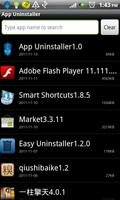
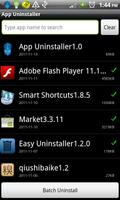
*Batch uninstall

*Fast uninstall by one click

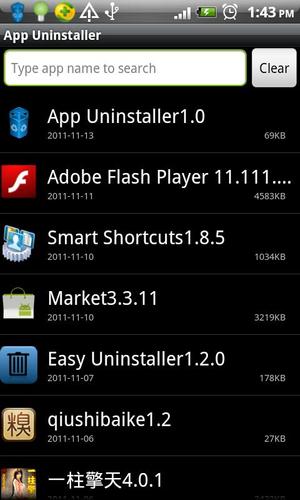
*Show app name,version,update time,size

*Search app by name

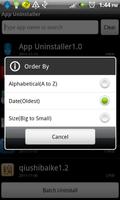
*Various sort mode

*App share

*Search in Google Market

*Support Android 2.3

***************************

#Description

Easy Uninstaller is a tool to uninstall apps for android phones. It is

quit easy to use, you can select multiple apps that you want to

uninstall, and click "Uninstall Selected Apps" button to uninstall

them. Easy Uninstaller also support app search & sort. Type the

keyword in the textbox in the top to search the app that you want to

uninstall. Click "Menu"->"Sort" to sort the apps in many sort types.

Long click on specified app, you will get a poped up context menu to

provide more options. You can view app details by click "Application

Details", you can share app by click "Share", and you can search the

app in the google market by click "Search in Google Market".

Easy Uninstaller cannot uninstall pre-installed apps in the system

#FAQ

Q: Why can't it list pre-load apps?

A: Pre-load apps cannot be uninstalled, only if your phone is rooted,

you can search "root uninstall" in google market.

Q: Why can't I close the app?

A: The notification bar icon is used for quick start of the app.If you

don't want the notification bar icon to be there after you exit the

app, you can just disable it in the setting, by click "Menu"-

>"Setting", uncheck the "Notification Bar Icon" checkbox.

#KW

app uninstall,easy uninstaller,uninstaller,App Uninstaller,app

remove,app remover,app delete,app manager,app list,batch remover,app

share,system panel,task manager
Download(74.79KB)
Users also viewed
  • Blues News

    Blues News

    1.7.2 January 14, 2026
  • Tip Worldcup 14 Brazil

    Tip Worldcup 14 Brazil

    0.9.9 January 13, 2026
  • Ayurvedic Upchar 1001+(Adults)

    Ayurvedic Upchar 1001+(Adults)

    1.01 January 13, 2026
  • Food For Your Blood Type Diet

    Food For Your Blood Type Diet

    2.3.0 January 12, 2026
  • mosquito repeller

    mosquito repeller

    1.2 January 12, 2026
  • Carolina Panthers Mobile

    Carolina Panthers Mobile

    24.4.1919 January 12, 2026
  • B42

    B42

    5.18.5 January 11, 2026
  • Motosumo

    Motosumo

    3.237.0 January 11, 2026
  • Iowa State Cyclones

    Iowa State Cyclones

    6.1203 January 11, 2026
  • rebar

    rebar

    12.0.0 January 11, 2026
  • Ovulation Period Calculator

    Ovulation Period Calculator

    2.9 January 10, 2026
  • Medical Record

    Medical Record

    1.1.24.09.11 January 10, 2026
  • Falundafa

    Falundafa

    1.400 January 8, 2026
  • McWallet

    McWallet

    9.2 January 8, 2026
  • Placar UOL

    Placar UOL

    5.6.5 January 8, 2026
About Privacy Policy Terms of Service Cooking Policy

© Copyright 2017-2026 downzr.com