



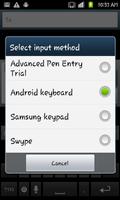
APE Advanced Pen Entry is a Simply Better Alternative to the OnScreen Keyboard.
A new input method for touchscreen devices that does non ambiguous handwriting recognition for much improved text entry on your tablet or phone. Simple to learn, easy to use, and as fully functional as an external keyboard.
version 1.0.2
Now recognizes the following cursor movement keys
Left, Right, Up, Down, PageUp, PageDown, Home, End, CtrlHome, CtrlEnd.
All are autorepeating.
All can be combined with Shift or ShiftLock for selecting text
BackSpace BS and Forward Delete DEL now work properly even when text is already selected.
The following shortcut strokes are recognized:
Ctrl A - select all
Ctrl C - copy selected text to clipboard
Ctrl V - paste text from clipboard
Ctrl X - cut selected text to clipboard
Ctrl Space - shows Menu (same as Menu Key, some devices no longer have a dedicated Menu Key)
Better recognition of K and G strokes
Added stroke for Euro € - sequence 2145
note Home and End do not work properly in some older versions of android, yet CtrlHome and CtrlEnd do!
=========================================
version 1.0.1 fixes problem where the letter Z was not properly recognized.
=========================================
Are you tired of your onscreen keyboard taking up too much screen space? It is not uncommon for an onscreen keyboard to take up half or more of the screen space. Are you ready for a smaller option - a "Small-ternative"? APE Advance Pen Entry for Android ™.
If you learned to hand print text back in the first grade, then you already know most of what is required for using APE Advanced Pen Entry - because you've been using it for years!
APE Advanced Pen Entry uses a small 3x3 grid, that defaults to only 1 inch tall on android devices, yet can be resized larger or smaller as desired. It works with your finger of choice, or a stylus if you prefer. (by making it larger, I have been able to successfully enter text using my elbow!)
APE allows you to enter text "single handedly". No need to use both hands.
Drawing text into the APE grid is very natural, using a finger or a stylus. Much more natural and smoother than poking at the screen!
All characters are entered on the APE grid using a single tap, or single continuous stroke. No need to cross the t or dot the i.
Pretty much all the characters of a standard external keyboard are available for easy use.
Full cursor key support allows you to accurately select, cut, copy and paste text with ease, and
without moving your finger from the APE grid.
Auto repeat is supported for all keys including cursor keys, Home, End, Left, Right, Up, and Down, by simply continuing to touch the screen after the character is drawn.
Help is always just a simple stroke away…
The {Help} stroke is a simple stroke from the bottom center region to the top center region. You will find much more information there. Or please view the video.
APE Advanced Pen Entry is an ongoing work in progress. Many updates are planned, depending on user requests.
The version of APE for the Gear 2 has proven to be "very workable" even on a 1.25 inch square screen. The version I am running on my Windows tablet has proven so useful, that I have not even needed to connect the external keyboard to it since installing it (over 6 months ago). I am hoping that the Android version proves to be just as useful! It is planned that an upcoming version will be a free floating and resizable window, just like in the Windows version.
This Trial version is identical to the Full version, except that it is free and will stop working after 7 days. However you can uninstall it and reinstall it as often as you would like!
The Full version will be available very soon...















 Download